 Back
Saturation and Tape Plugins Compared: FabFilter Saturn 2, ChowTapeModel, Klanghelm IVGI and More
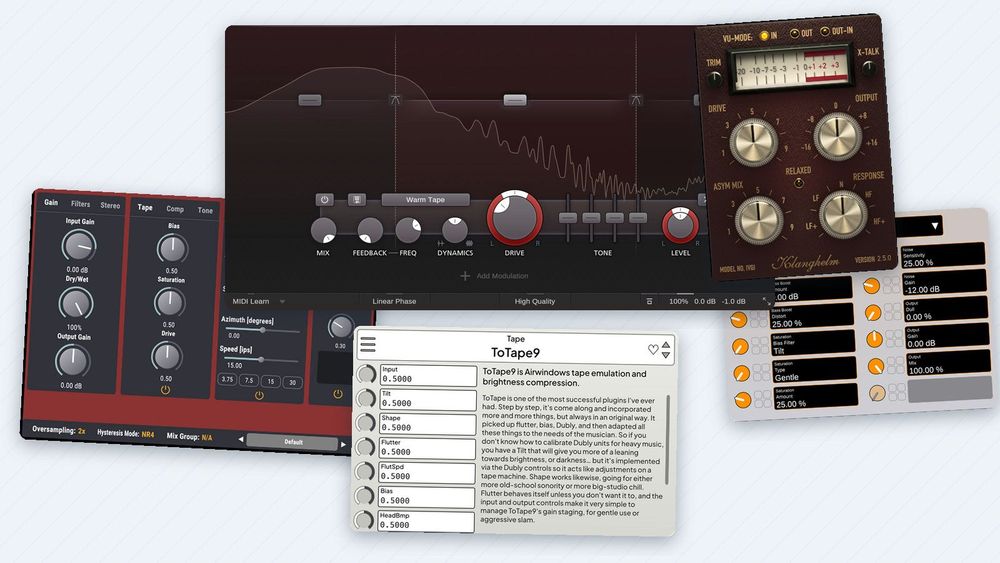
Saturation adds new harmonics to a sound: frequencies that weren't in the recording before. A little can make a bass easier to hear on a phone speaker or help a mix bus feel more of a piece; a lot turns into obvious distortion. You don't need to spend money to try it. ChowTapeModel, Klanghelm IVGI, Airwindows Consolidated and Surge XT Effects are free, and FabFilter Saturn 2, the paid plugin in this comparison, runs as a full 30-day trial.
This guide explains what saturation does, with diagrams computed from the math, then compares those five plugins with real screenshots of each. After that come four moves you can copy, each shown on a real screenshot with the settings visible, and a short section on aliasing and oversampling. Versions and prices are as of November 2026.
What saturation does to a sound
A saturator is a transfer curve: every input level maps to an output level. A straight line changes nothing. A curve that bends near the top squeezes the loudest parts of the wave, and that change of shape is what creates new harmonics.

Three basic curves, computed. Soft clipping rounds the peaks of a sine; hard clipping flattens them; an asymmetric curve treats the top and bottom halves differently.
The shape of the curve decides which harmonics appear. Oli Freke explains in Sound On Sound that a heavily clipped wave starts to look like a square wave, so clipping adds mostly odd harmonics (3, 5, 7…). When the two halves of the wave are distorted differently, even harmonics (2, 4, 6…) join them. That is what the labels on plugins point to: Freke notes that tape produces both odd and even harmonics, and that an overdriven tube is often especially rich in the 2nd harmonic. Our free Synth Waveforms and Their Harmonics sheet shows the harmonic recipes of familiar waveforms: a square wave holds only odd harmonics, a saw holds all of them.

The harmonics each curve adds to one sine, computed with an FFT. The symmetric curves add only odd harmonics; the asymmetric one adds a strong 2nd harmonic at −20 dB.
Compare the two symmetric curves as well: hard clipping keeps more energy in the upper harmonics (its 9th sits at −33 dB here, against −45 dB for the soft curve). The 2nd, 3rd and 4th harmonics sit an octave, an octave and a fifth, and two octaves above the note you play; our article on the harmonic series explains how their mixture shapes an instrument's tone. Saturation also evens out levels a little. Freke notes that it reduces dynamic range and can soften transients, which is part of why it's used on groups and mix buses.
Tape plugins model two more things. ChowTapeModel's manual describes bias, an inaudible high-frequency signal real tape machines add while recording, and wow and flutter, small speed changes in the tape transport that make the pitch waver. Each tape plugin labels these its own way, as you'll see below.
The five saturation plugins, one by one

The five plugins side by side, from each developer's own pages on November 20, 2026. Four are free; Saturn 2 lists at $149 after its trial.
FabFilter Saturn 2: multiband, with many styles
Saturn 2 (version 2.13) lists at $149, and the download is a fully functional 30-day trial. It splits the sound into up to six bands, and each band gets its own style, drive, mix, feedback, dynamics, tone and level. There are 28 styles in six families (tube, tape, amp, saturation, transformer and FX), plus a modulation system. Formats are VST, VST3, AU, CLAP and AAX for Windows and macOS.

Saturn 2 (version 2.13, trial) on a loop of drums, bass and chords: three bands split at 120 Hz and 4000 Hz. The middle band uses Warm Tape at 34.9% drive; the lows use Subtle Tube, the highs Gentle Saturation.
The Style button opens the families as a menu. In the Tape family you'll find Subtle, Clean, Warm and Old Tape.

The style menu: six families, 28 styles in all. Warm Tape is the default.
- Pros: separate styles and drive per band, so you can drive the highs and leave the lows clean; FabFilter's manual says the output level is adjusted automatically as you raise the drive; High Quality modes (8x or 32x oversampling) and a Linear Phase option; a spectrum display behind the bands.
- Cons: $149 after the trial; no Linux version; the knobs show no numbers at rest, and the modulation system takes time to learn; FabFilter warns that the 32x mode can raise CPU load a lot.
- Suits: anyone who wants one plugin for gentle color, bass work and heavy distortion, with precise control over where it happens.
ChowTapeModel: a free tape machine
ChowTapeModel (version 2.11.4) from Chowdhury DSP is free and open source under the GPL-3.0. It's a physical model of a reel-to-reel tape machine, first based on a Sony TC-260 and described in a 2019 DAFx conference paper. It runs on Windows, macOS and Linux (plus iOS) as VST, VST3, AU, CLAP, LV2 and AAX.

ChowTapeModel 2.11.4 at its defaults on the same loop. The heart of it is the Tape panel (3): Bias, Saturation and Drive, each 0.50.
In the manual, Drive sets how hard the tape's magnetic "hysteresis" is pushed, Saturation sets how early it saturates (higher means more distortion), and lower Bias settings create the "deadzone" effect of underbiased tape. The Wow tab adds slow pitch drift.

Wow at depth 0.24, rate 0.25. Variance and Drift make the drift less regular.
- Pros: free on every desktop system; a deep model (bias, wow and flutter, playhead loss, wear); Dry/Wet; input and output readouts for level matching; an oversampling setting.
- Cons: technical controls (microns, inches per second) take learning; the manual warns that abnormally large input levels can make it unstable and advises adding gain with Input Gain; the developer notes that FL Studio users who hear pops may need FL's "use fixed size buffers" option.
- Suits: anyone who wants the tape sound with its quirks, from subtle to worn-out.
Klanghelm IVGI: free, simple and subtle
IVGI (version 2.5.0) is freeware from Klanghelm. Klanghelm says it can do soft saturation "at home on the master buss" as well as dense distortion. It runs on Windows 10 or later and macOS 10.13 or later as VST, VST3, AU and AAX.

IVGI 2.5.0: Drive 4.99, Asym Mix 5.00, Response N, Output 0.0 dB, VU mode IN.
ASYM MIX isn't a dry/wet control. The manual calls it a transparency control: toward 10 the saturation becomes asymmetric and more transparent, toward 0 symmetric and more compressing. RESPONSE moves the saturation toward the lows (LF+) or the highs (HF+).
- Pros: free; few controls; calibrated so 0 VU equals −18 dBFS, with a clear trim-drive-output workflow in the manual; a VU mode that shows the difference between output and input for level matching.
- Cons: no Linux version; no dry/wet mix; no curve or spectrum display and no quality (oversampling) setting.
- Suits: buses and whole mixes when you want gentle color without many decisions.
Airwindows Consolidated: hundreds of effects, two to start with
Airwindows Consolidated (build of November 15, 2026) puts the whole Airwindows collection, more than 350 effects, into one free plugin, with the code under the MIT license. It comes as VST3, AU, CLAP and LV2 for Windows, macOS and Linux. Two of its effects suit this job: ToTape9, in the Tape category, and Tube2, in Saturation.

ToTape9 at its defaults: every control at 0.5000 except HeadFrq, 68.7500 hz. The developer's notes fill the right side.
The menu starts with a Recommended collection; choose All plugins under Filter by Collections to see everything. Click the effect's name to search by typing; click a value box to type a number. Tube2 has just two controls. Its developer notes that it's close to level matched with Input at 0.5.

Tube2: Input 0.5000, Tube 0.5000.
- Pros: free and open source on all three systems, including CLAP and LV2; one plugin, many flavors; each effect's notes on screen.
- Cons: most controls run from 0 to 1 rather than in dB or Hz, with no meters or graphs, so you work by ear; the developers' own manual calls the size of the collection daunting.
- Suits: curious listeners and Linux users who want to explore many saturation and tape flavors for free.
Surge XT Effects: a free multi-effect with saturators
Surge XT Effects (version 1.3.4) comes with the free, open-source Surge XT synth and runs one of Surge's effects at a time. It's available for Windows (VST3, CLAP), macOS (VST3, AU, CLAP) and Linux (VST3, CLAP, LV2). Its Distortion group holds six effects.

The effect menu. Tape is Surge's port of ChowTapeModel; Waveshaper offers the synth's full list of shapes, with Bias and Mix.
Bonsai, which the manual describes as a "highly non-linear bass boost with an emphasis-filtered waveshaper and noise AM" (amplitude-modulated noise), is ready to use at its defaults.

Bonsai at its defaults: Saturation Type Gentle, Amount 25.00 %, Mix 100.00 %.
- Pros: free and open source on all three systems; several saturators in one download, several with a Mix control; every value is printed in its own box.
- Cons: one effect per instance; picking an effect loads its default settings; no curve display in the effects plugin.
- Suits: beginning producers who also want a free toolbox for sound design.
Four saturation moves, shown on real screenshots
Treat every value below as a starting point, and judge the result in the whole mix.
1. Gentle color on a mix bus
Freke suggests the gentler kind of distortion, saturation, for groups and mix buses, and much more subtlety again on a whole mix in mastering. IVGI's manual gives a simple order: set TRIM so the input sits around 0 VU, raise DRIVE to taste, then use OUTPUT to make up any level change.

IVGI set up for a bus: Drive 2.49, Asym Mix 6.99, VU mode OUT−IN. The meter is at rest in this picture; during playback the needle shows the output minus the input, and you turn OUTPUT until it hovers around 0.
Start with drive low and listen with the plugin on and off. If the change is obvious on its own, it's probably too much for a bus.
2. Help a bass come through on small speakers
Freke describes a classic way to make a deep bass more audible on small speakers, such as a phone's: add distortion to the upper part of the bass, so its harmonics fill the low mids and it seems louder, while the original low end stays untouched. He does it on a parallel channel: distort a copy of the whole bass, then cut the copy's low end. A multiband saturator gets close in one plugin, with one difference: a band can only add harmonics to what reaches it. On a bass that already has some content above the split, like the one below, that works well; for a very pure sub, use Freke's parallel version, or drive the low band a little as well.

Saturn 2 on a bass loop: below 150 Hz, Clean Tube at 0.00% drive; above it, Warm Tube at 50.0%.
The 150 Hz split is a starting point: it sits above the fundamentals of most bass notes (the open low E of a bass guitar is about 41 Hz), so those stay clean. Check the result on a small speaker or earbuds, and at low volume.
3. Blend heavy saturation in parallel
In a parallel blend, you mix the processed signal with the untouched one, so you can drive the processing hard and still control how much of it you hear. Saturn 2 has a MIX knob in every band; Saturator in Ableton Live and ChowTapeModel have Dry/Wet.
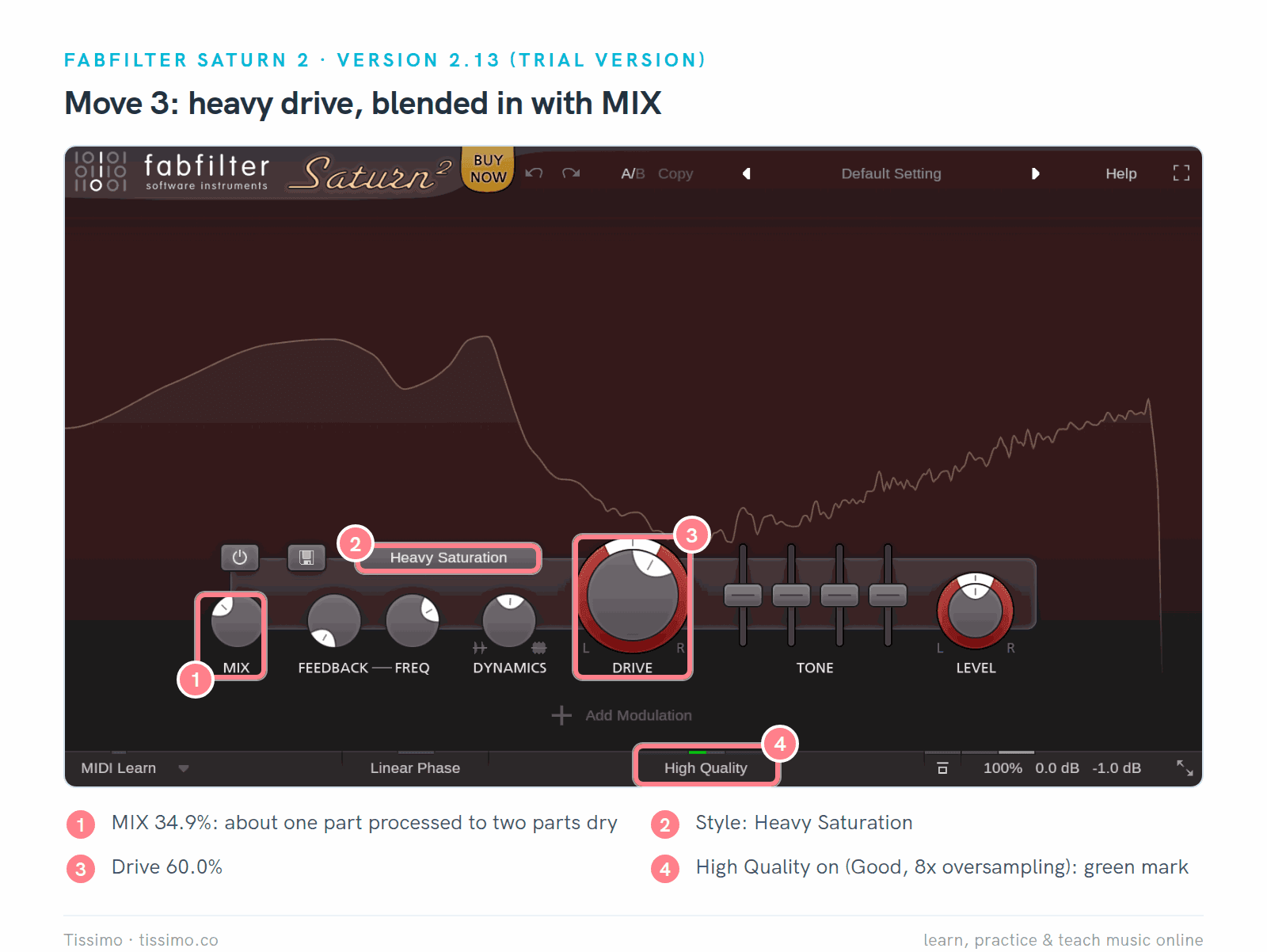
Heavy Saturation at 60.0% drive, with MIX at 34.9%: roughly one part processed to two parts dry. High Quality is on (Good, 8x oversampling).
Try more drive than you'd use at 100% mix, then lower MIX until the effect sits where you want it.
4. Match the level before you judge
Saturation often makes a sound louder, and Matt Houghton of Sound On Sound points out that perceived loudness affects what we hear as better. He finds level matching almost always useful on the master bus, and often when shaping one sound on its own; on individual tracks during a mix he prefers to judge the change in the full mix. IVGI's developer built the OUT−IN meter mode for exactly this, so you aren't "fooled by 'louder is better'".

With Drive 0.74 and Saturation 0.65, the readouts showed IN −23.0 dB and OUT −19.2 dB at Output Gain 0.00 dB. Output Gain −3.80 dB brings OUT back to −23.0 dB.
Then switch the plugin on and off at the same listening level. Headphones work fine for this; our beyerdynamic DT 770 PRO X review looks at one closed pair for home recording.
Aliasing and oversampling
Digital audio can't hold frequencies above half its sample rate (24 kHz at 48 kHz). Sam Fischmann explains in Sound On Sound that when a plugin creates harmonics above that limit, they fold back into the audible range as aliasing, at frequencies that aren't harmonically related to the note. Oversampling runs the saturation at a higher internal rate, then filters the extra harmonics away.

Hugh Robjohns' Sound On Sound example, computed: a clipped 10 kHz sine folds back to 18 kHz and 2 kHz. With 8x oversampling, the leftovers drop to −57 dB or lower.
Fischmann also notes that aliasing from one plugin is often too quiet to hear, and suggests switching oversampling on only when an A/B comparison reveals a difference. Saturn 2 has High Quality modes (Good is 8x, Superb 32x), ChowTapeModel has an Oversampling setting, FL Studio's Fruity WaveShaper has an Oversample control, and Live's Saturator has a Hi-Quality mode in its context menu.
Using them in Ableton Live, FL Studio and Logic Pro
Every plugin here comes in a format for all three DAWs; install the one your DAW loads. Our guide to VST plugins and how to install them covers the steps.
- Ableton Live 12 loads VST2, VST3 and, on the Mac, Audio Units. Its Saturator has eight curve types; Bass Shaper is meant for low-end signals, and the Color filters can keep the bass out of the shaper, much like move 2. Roar (Suite only), a saturation device with up to three stages, has a Multi Band mode. Saturator is in every edition. Our Ableton mixing article works through a small mix with Live's stock devices.
- FL Studio loads VST, VST3 and CLAP, plus AU on the Mac. Fruity Soft Clipper, which Image-Line describes as a soft limiter that saturates above its threshold, and Fruity WaveShaper, where you draw your own curve, with Mix and Oversample controls, cover the basics; Maximus (Producer Edition and up) has a saturator in each of its three bands.
- Logic Pro loads third-party plugins only as Audio Units, so install the AU versions; all five plugins here offer one on the Mac. Its ChromaGlow (Macs with Apple silicon) has five saturation models, including Magnetic, modeled on tape machines, plus Mix and a Bypass Below control that leaves frequencies under a threshold untouched; Overdrive and Distortion are in the same menu.
When is the built-in one enough? For all four moves, in all three DAWs. Move 2 can always be done the way Freke describes it, with a second channel, a stock distortion and a low cut, and some devices do it in one place: Saturator's Color filters and Roar's Multi Band mode in Live, ChromaGlow's Bypass Below in Logic, and Maximus in FL Studio. You'd add a plugin for tape behavior such as wow and flutter, for more bands and styles than your DAW offers, or for a workflow you prefer. Our guides to the best plugins for Ableton Live 12, FL Studio and Logic Pro list more add-ons.
Which saturation plugin should you use?
Start with the saturator in your DAW. Add IVGI for gentle color, ChowTapeModel for tape, and try Saturn 2's trial if you want precise multiband control.

Pick by the job. Every option here can add gentle saturation; Saturn 2 is the one built around splitting it into bands.
Saturation pairs naturally with dynamics: our compressor plugins comparison and limiter guide cover the next steps. If you'd like someone to listen with you and hear when it's too much, a Tissimo music production teacher can do that in a live online lesson.
Free worksheets for this lesson
- Synth Waveforms and Their Harmonics — harmonic recipes for sine, square, saw and triangle, with audio to compare
Sources
- Saturn 2 — FabFilter
- Saturn 2 help: band controls — FabFilter
- Saturn 2 help: input/output options — FabFilter
- Downloads and trial terms — FabFilter
- Shop and prices — FabFilter
- ChowTape User Manual — Chowdhury DSP
- AnalogTapeModel (ChowTapeModel) README — Chowdhury DSP
- IVGI — Klanghelm
- IVGI 2 user guide — Klanghelm
- Airwindows Consolidated plugin manual — Airwindows / Paul Walker
- Tube2 — Airwindows
- Surge XT User Manual — Surge Synth Team
- New Harmonics, Oli Freke — Sound On Sound
- When Should You Use Oversampling?, Sam Fischmann — Sound On Sound
- Q. What is aliasing and what causes it?, Hugh Robjohns — Sound On Sound
- Q. Should I use my plug-ins' automatic level compensation?, Matt Houghton — Sound On Sound
- Live 12 Reference Manual: audio effects — Ableton
- Live 12 Reference Manual: using plug-ins — Ableton
- Compare Live 12 editions (archived October 21, 2026) — Ableton
- Plugin standards — Image-Line
- Maximus — Image-Line
- Maximus controls — Image-Line
- Fruity WaveShaper — Image-Line
- ChromaGlow in Logic Pro for Mac — Apple
Read this article online: https://tissimo.co/articles/saturation-and-tape-plugins-compared-saturn-2-chowtapemodel-ivgi-and-more



Comments