 Back
Free Synth Plugins Compared: Surge XT, Dexed, Odin 2, TAL-NoiseMaker and u-he's Free Synths
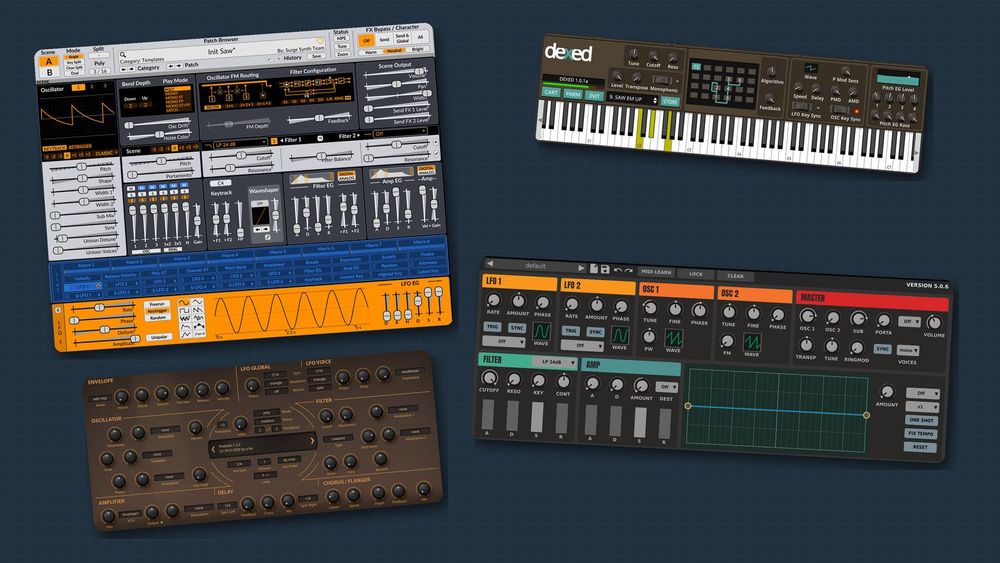
You don't need to spend money to get a serious software synthesizer. This guide compares seven free ones that run on Windows and Mac and load in Ableton Live, FL Studio and Logic Pro: Surge XT, Dexed, Odin 2, TAL-NoiseMaker and three of u-he's free synths (Tyrell N6, Podolski and Zebralette 3). For each: what it is, who it suits, honest pros and cons, and one setting to try first, on real screenshots with notes playing. Then you'll build a plucky bass in five steps. Prices and versions are as of November 2026.
If oscillators, filters and envelopes are new to you, read Synthesizer Basics: Oscillators, Filters, ADSR and LFOs first.
How we compared them
We installed every synth, played the same chord on each, and checked each claim against the developer's own pages and manual. For each one we looked at:
- Synthesis type: how it makes its raw sound (subtractive, FM or wavetable).
- Presets: how many come with it, if the developer says, and how easy they are to browse.
- Ease of use: how many controls sit on the main panel and whether anything is hidden.
- Documentation: whether a current manual exists.
- Formats and systems: VST3, AU, CLAP or AAX, on Windows, Mac and Linux.
- License: free, open source, or a public beta.

The three kinds of synthesis in this lineup. Subtractive synths start with a bright wave and filter it; FM synths bend one sine wave with another; wavetable synths sweep through a set of stored shapes.
The table sums up what we found; the sections after it show each synth on screen.

The lineup at a glance. Licenses, formats, systems and preset counts come from each developer's own pages and releases; AU versions are Mac only.
Surge XT: the deepest free synth here
Surge XT is a free, open-source synth (GPL-3.0) maintained by the volunteer Surge Synth Team; version 1.3.4 is current. It describes itself as a "subtractive hybrid": each patch has two scenes, each with three oscillators chosen from 12 algorithms (Classic, Wavetable, FM2, FM3, String and more), two filter units and 12 LFOs. It ships with over 2,800 patches and 700 wavetables.
Who it suits: anyone who wants one instrument to grow into for years.
Pros: a huge factory library; two scenes you can layer or split; VST3, CLAP and standalone on Windows, Mac and Linux, plus AU on Mac and LV2 on Linux; a detailed online manual.
Cons: the main window packs oscillators, routing, filters, envelopes, a modulation strip and effects into one view, so it takes a while to read. There is no AAX version for Pro Tools.
First-sound tip: load the Init Saw template, switch Filter 1 from Off to LP 24 dB and set its Cutoff near 600 Hz. Then, in the Filter EG, raise the ▸F1 slider, set the decay near 400 ms and drop the sustain to zero. Each note now starts bright and closes down, which gives the buzzy saw a plucked attack.

Surge XT 1.3.4 playing a three-note chord (3 / 16 voices). Filter 1 reads LP 24 dB, cutoff 600.00 Hz, resonance 30.00%; the Filter EG has decay 400.0 ms and sustain 0.00%, and its ▸F1 amount is 24.00 semitones.
To browse sounds, use the Category and Patch arrows under the patch name; the manual notes that right-clicking the name lists every patch in the current category.
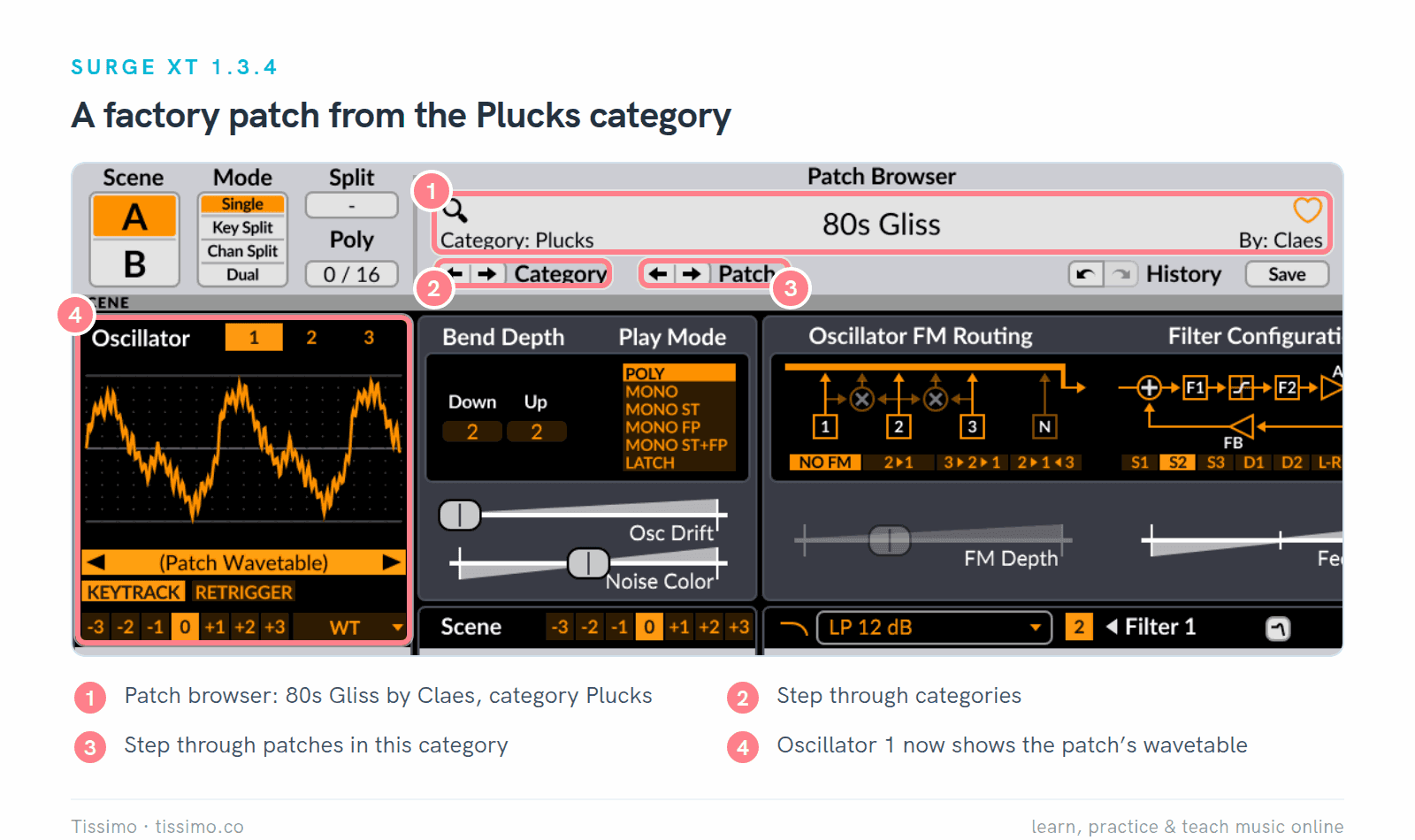
A factory patch loaded with the Category arrows: 80s Gliss, from the Plucks category.
Dexed: FM synthesis modeled on the DX7
Dexed, by Digital Suburban (developer asb2m10), is a free, GPL-3.0 FM synth "closely modeled on the Yamaha DX7". It has six operators (sine oscillators that can modulate one another), 32 algorithms that wire them together, and a librarian that loads DX7 cartridge files. Version 1.1.0 (October 31, 2026) is current and comes as VST3, CLAP and standalone, plus AU on Mac; our screenshots show version 1.0.1.
Who it suits: players who want electric pianos, bells and other classic FM sounds.
Pros: all 144 DX7 parameters on one panel; it reads DX7 SysEx files, so you can load cartridges; each operator has its own level meter.
Cons: FM is less intuitive than filtering a saw, and the developer itself says "minimal documentation" exists. No AAX version.
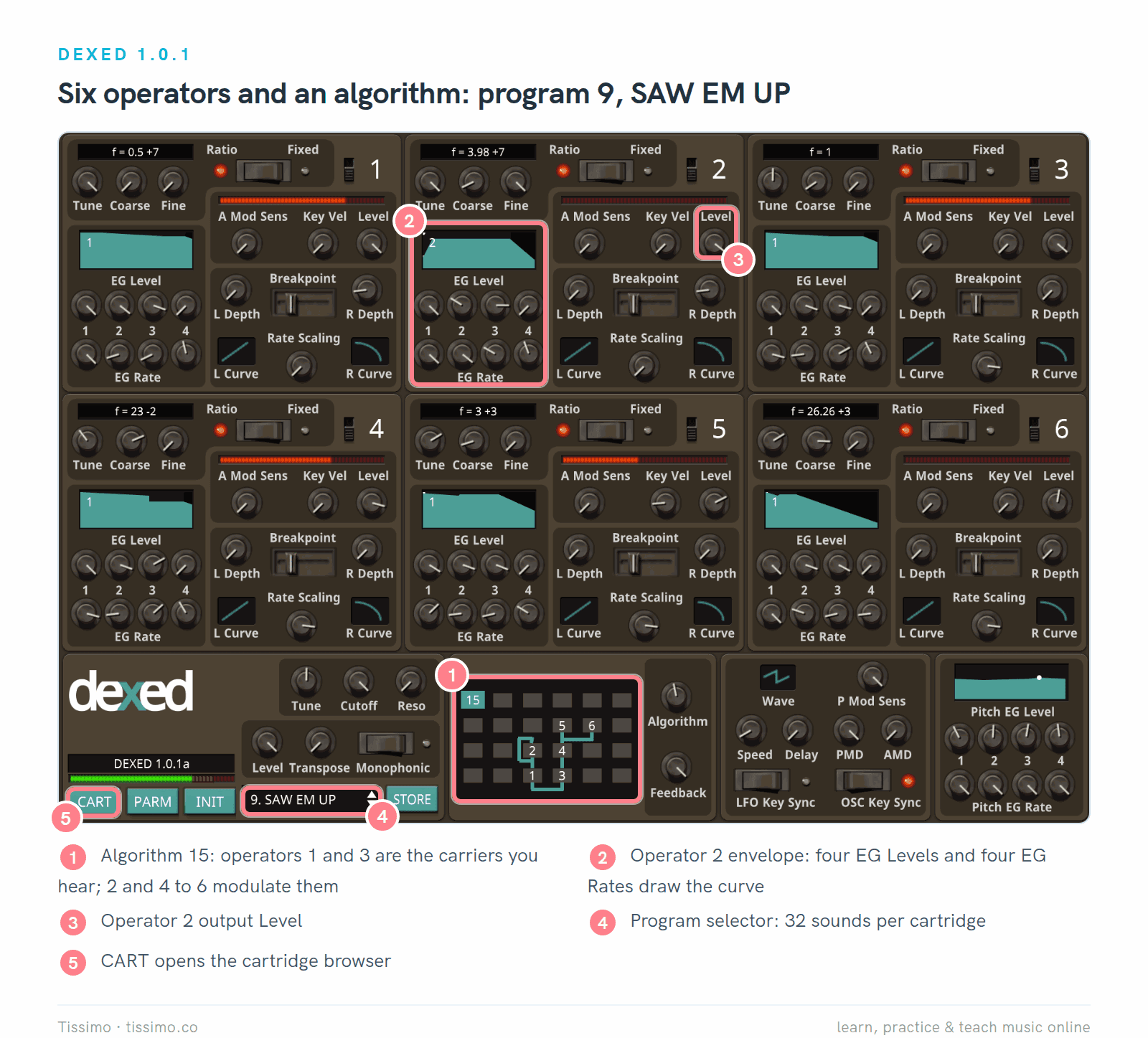
Dexed 1.0.1 with program 9, SAW EM UP, from the cartridge of 32 programs it loads by default. The algorithm display reads 15: operators 1 and 3 sit at the bottom as carriers, and the others are stacked above them as modulators.
The carriers are what you hear; the modulators change their tone. The louder a modulator, the more side bands become strong enough to hear, as Sound On Sound's Synth Secrets series explains.

Side-band amplitudes computed from the Bessel functions for one sine carrier and one sine modulator. Raising the modulator's level raises the index and spreads the energy.
First-sound tip: if an FM preset sounds too harsh, find a modulator in the algorithm display and turn its output Level down a little. Here operator 2 modulates carrier 1.
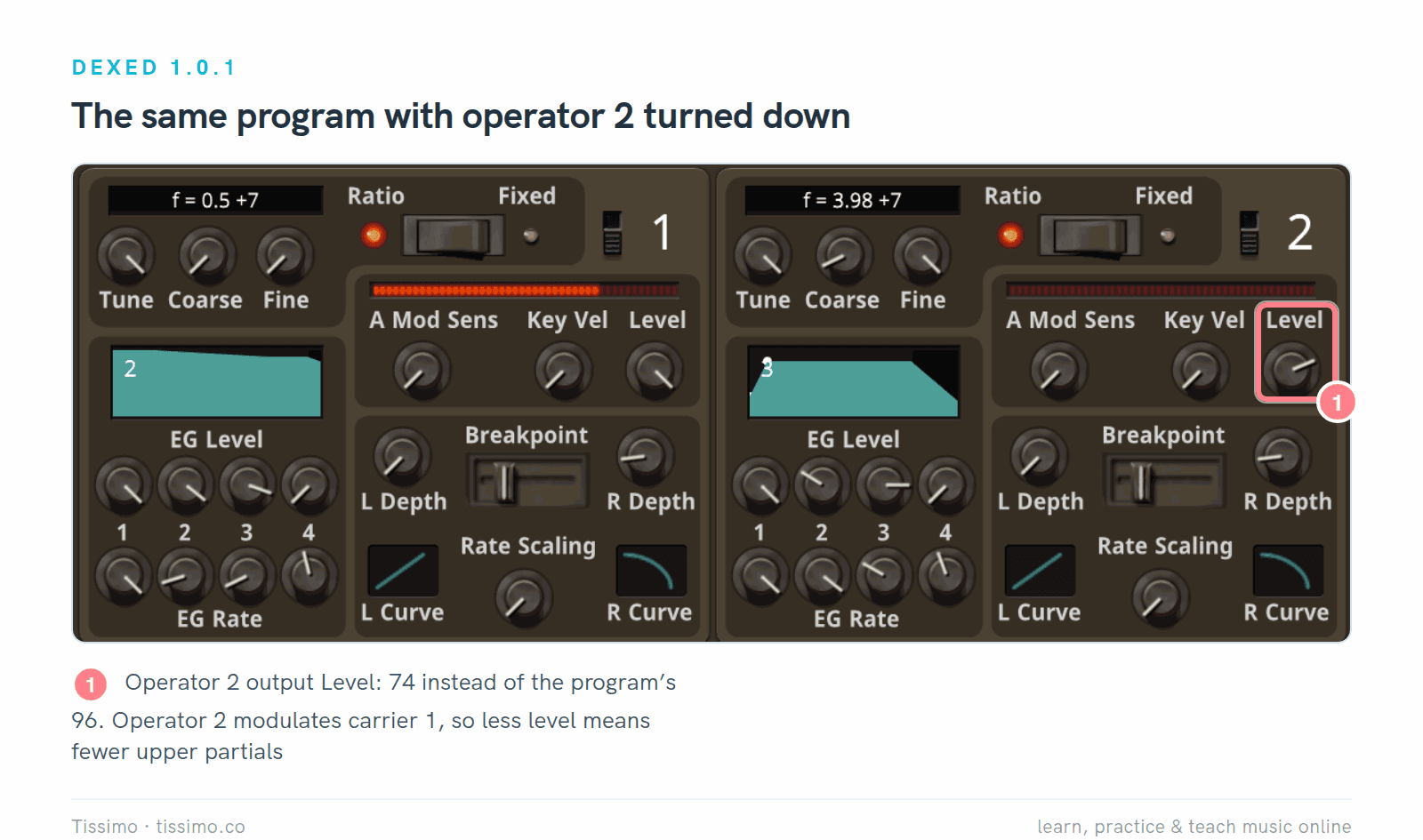
The same program with operator 2's output Level at 74 instead of 96. Less modulator level gives fewer upper partials, so the tone gets mellower.
Odin 2: semi-modular and open source
Odin 2 by TheWaveWarden is a free, open-source (GPLv3) "semimodular subtractive" synth with 24-voice polyphony. Each of its three oscillator slots takes one of 11 types (Analog, Wavetable, FM, Chiptune, WaveDraw and more), and its three filter slots include emulations of classic ladder and Korg 35 filters. Four envelopes, four LFOs, a mod matrix, an arpeggiator and five effects complete it. The current release is 2.4 (2.4.0 or 2.4.1, depending on the system), as VST3 and CLAP on every system, plus AU on Mac and LV2 on Linux.
Who it suits: curious sound designers who like swapping modules and routing things.
Pros: modules you can swap per slot; a large mod matrix; open source.
Cons: the manual linked from the product page is for version 2.3.0, older than the interface overhaul in 2.4; version 2.4.0 also removed Odin's own MIDI learn, so you map knobs in your DAW instead; there is no AAX version; and the developer doesn't publish a preset count.
First-sound tip: Odin opens with an Analog Osc in slot 1 and a Lowpass 24 filter fully open, so the first sound is bright. Pull the filter frequency down and give it some envelope amount.

Odin 2 (2.4.1) with Filter 1 frequency at 800 Hz, resonance 0.30 and envelope amount 0.50, and the filter envelope's decay at 0.40, as the plugin reports them to the host; the panel itself shows no numbers. Oscillator slots 2 and 3 stay empty until you choose a module. A few labels are cut short in this capture (Detune, Width, Master); the developer's own screenshot shows them in full.
TAL-NoiseMaker: the friendliest first synth
TAL-NoiseMaker from TAL Software is free (TAL lists it under "FREE Plug-Ins"). It is a virtual analog synth with two oscillators plus a sub oscillator, a resonant filter with its own envelope, two LFOs, and built-in chorus, reverb and delay. Version 5.0.6 is current, as VST, VST3, AAX and CLAP (plus AU on Mac) for Windows and Mac, and VST2 and VST3 on Linux. It comes with 256 presets.
Who it suits: first-time synth programmers. TAL's own description, "Easy to use, no hidden panels", matches what you see.
Pros: every control on one panel; AAX for Pro Tools; MIDI learn for all knobs.
Cons: up to six voices only, so big sustained chords can run out; the user guide dates from 2012 and shows the older interface; the knobs carry no numbers, and the display at the bottom right shows one parameter's value at a time.
First-sound tip: the five-step recipe below starts from this default patch.
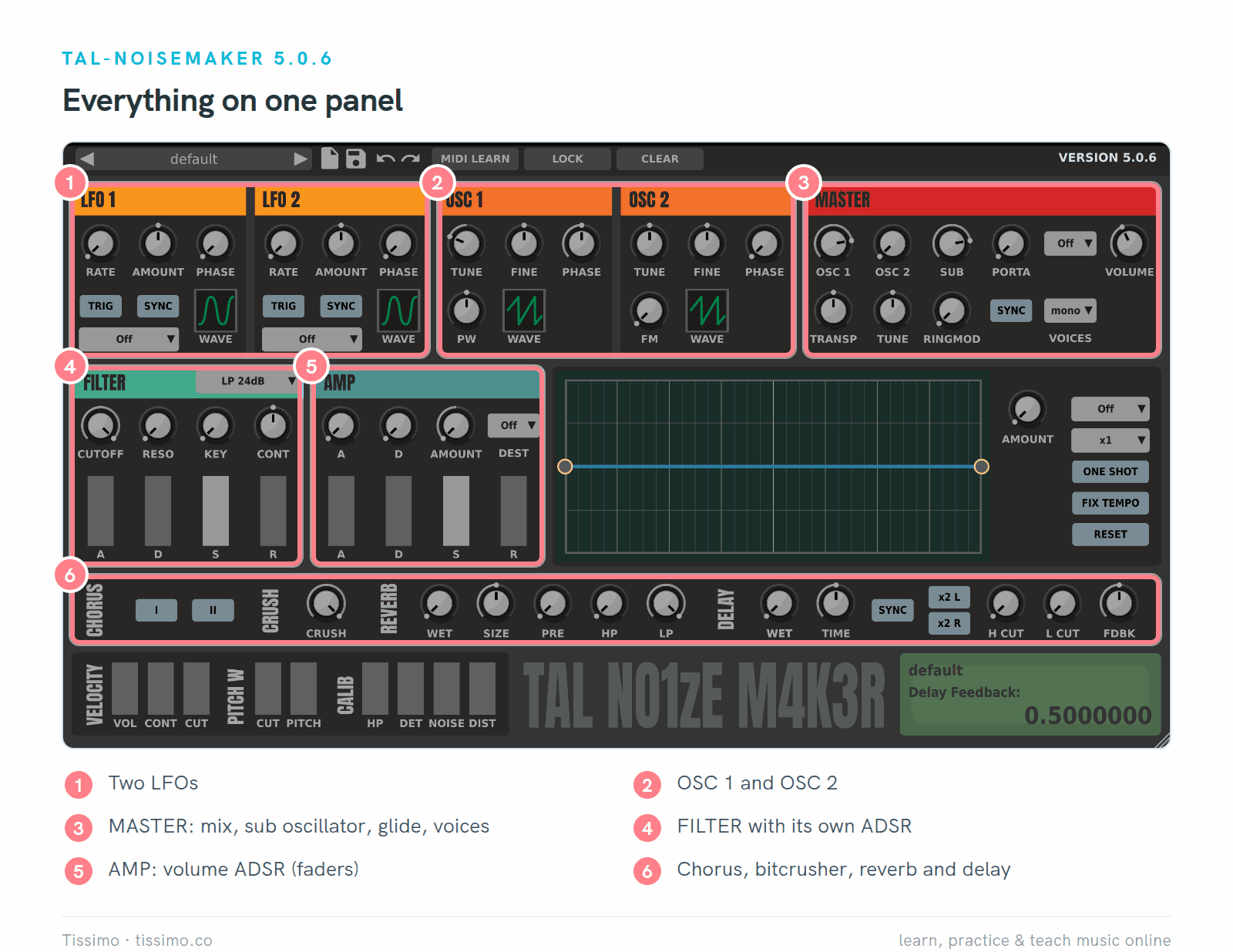
TAL-NoiseMaker 5.0.6 in its default patch: one saw an octave down plus the sub oscillator, filter fully open.
Mini-recipe: a plucky bass in TAL-NoiseMaker
Load TAL-NoiseMaker on a MIDI track, start from the default patch, and loop a simple eighth-note bass line around C2 to C3 (the default patch already sounds an octave below the keys you play). Change one thing per step and listen before moving on. TAL reports most of its settings as values from 0 to 1, so the numbers below are on that scale: treat them as starting points.
Step 1: the source. The default already plays OSC 1's saw tuned −12 semitones, with VOICES on mono, which suits a bass. Turn SUB down from 0.80 to 0.50 so the sub oscillator adds weight without taking over. A saw contains every harmonic, which gives the filter plenty to work on; Synth Waveforms and Their Harmonics shows the recipe.
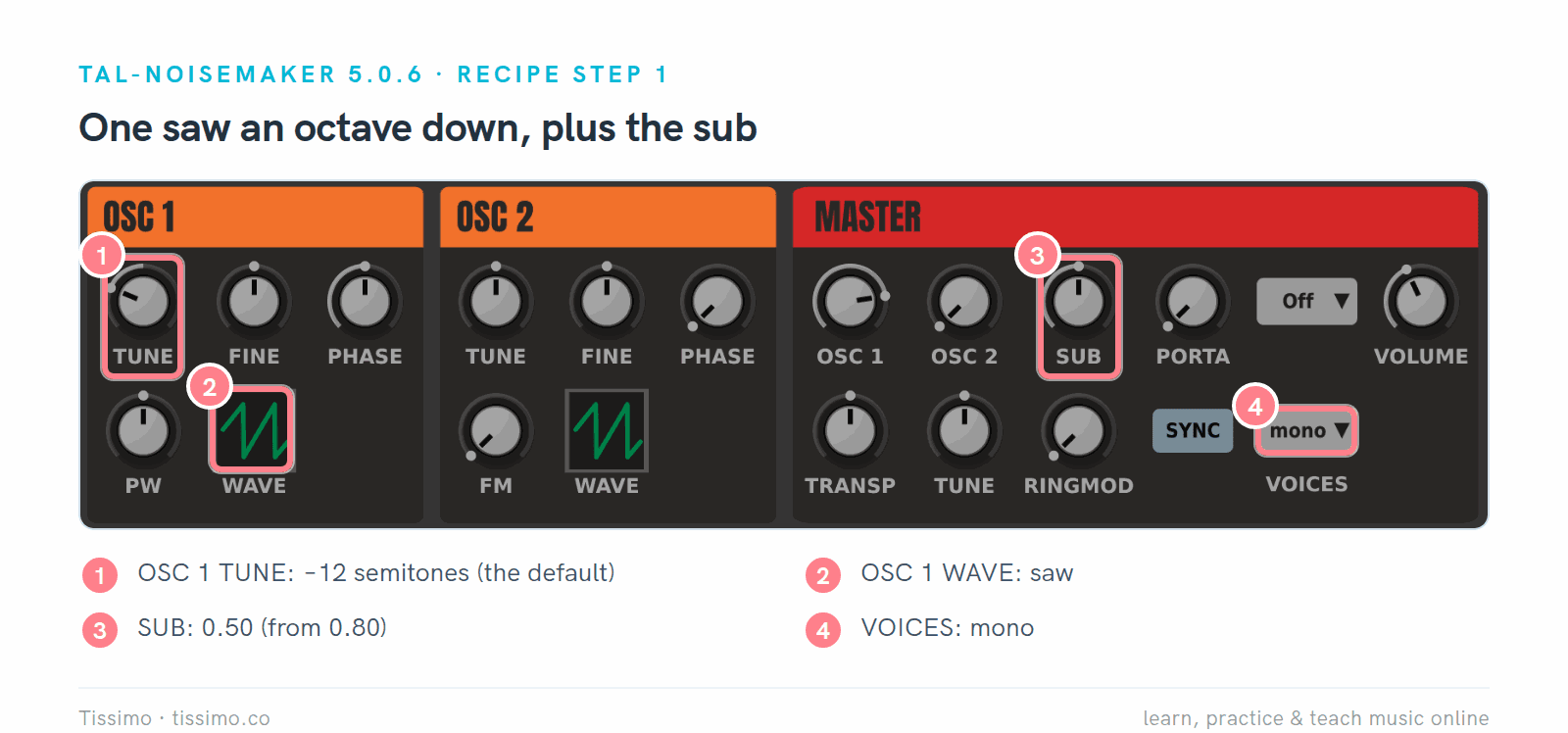
Step 1: OSC 1 TUNE at −12 semitones, saw wave, SUB at 0.50, VOICES mono.
Step 2: close the filter. Turn CUTOFF down from 1.00 to 0.35 and RESO up to 0.30. The tone gets darker, with a slight edge at the cutoff.

Step 2: CUTOFF 0.35 and RESO 0.30 on the LP 24dB filter.
Step 3: add the pluck. Turn CONT (contour, how much the filter envelope moves the cutoff) up from its center position to 0.60. CONT is the one knob here that runs from −1 to +1, with 0 in the middle, so 0.60 sits about four fifths of the way round. Then set the filter's D fader to 0.40 and S to 0. Each note now starts bright and closes quickly. TAL's guide notes that the filter envelope does nothing while cutoff is fully open, which is why step 2 comes first.

Step 3: CONT 0.60 (on its −1 to +1 scale), filter D 0.40 and S 0.00.
Step 4: shape the volume. On the AMP faders (not the A and D knobs above them, which belong to a separate assignable envelope), set D to 0.45, S to 0.40 and R to 0.15, leaving A at 0 for a fast start. The note settles to a lower level while you hold it and fades quickly when you let go.

Step 4: AMP D 0.45, S 0.40, R 0.15; A stays at 0.
Here is what steps 3 and 4 do to one held note.

A schematic of the two envelopes, not TAL's exact timing. The brightness is a short accent; the level holds while the key is down.
Step 5: glide. Set PORTA to 0.25 and the mode menu beside it to Auto. Now notes that overlap slide into each other, while separate notes don't. Save the result with the disk icon at the top.

Step 5: PORTA 0.25, mode Auto, VOICES mono. Overlap two notes in your MIDI clip to hear the slide.
For bass lines to play it with, see Music Theory for Producers: Turn a Chord Loop into Basslines and Arpeggios.
Three free synths from u-he: Tyrell N6, Podolski and Zebralette 3
u-he, maker of Diva and Zebra, gives away several synths; we compare three of them (its freeware list also includes Triple Cheese). All three are free downloads; u-he calls its Linux builds beta.
Tyrell N6 began as an unbuilt hardware design by the online magazine Amazona.de. The current download is a free "2025 beta" of version 3.0.0, a step, u-he says, before a graphic makeover. It has two oscillators, noise and ring modulation, a filter related to an early Diva model, two LFOs, unison of up to eight voices, and over 580 presets. Formats: VST3, AU, CLAP and AAX.
Who it suits: players who want classic analog-style polysynth sounds from a fixed panel.
Pros: a classic layout with "no panel switching or menu diving at all", a big library and an updated user guide.
Cons: it is a public beta, and its look is due for a change.

Tyrell N6 3.0.0 public beta in its initial patch: filter LP / HP mode at 24 dB/Oct, every section on one fixed panel.
First-sound tip: pull the filter's CUT fader down, turn MOD 1 up (its source is already ADSR2, the ENV 2 envelope) and drop ENV 2's S fader to zero. Each note now opens the filter, then lets it close again.
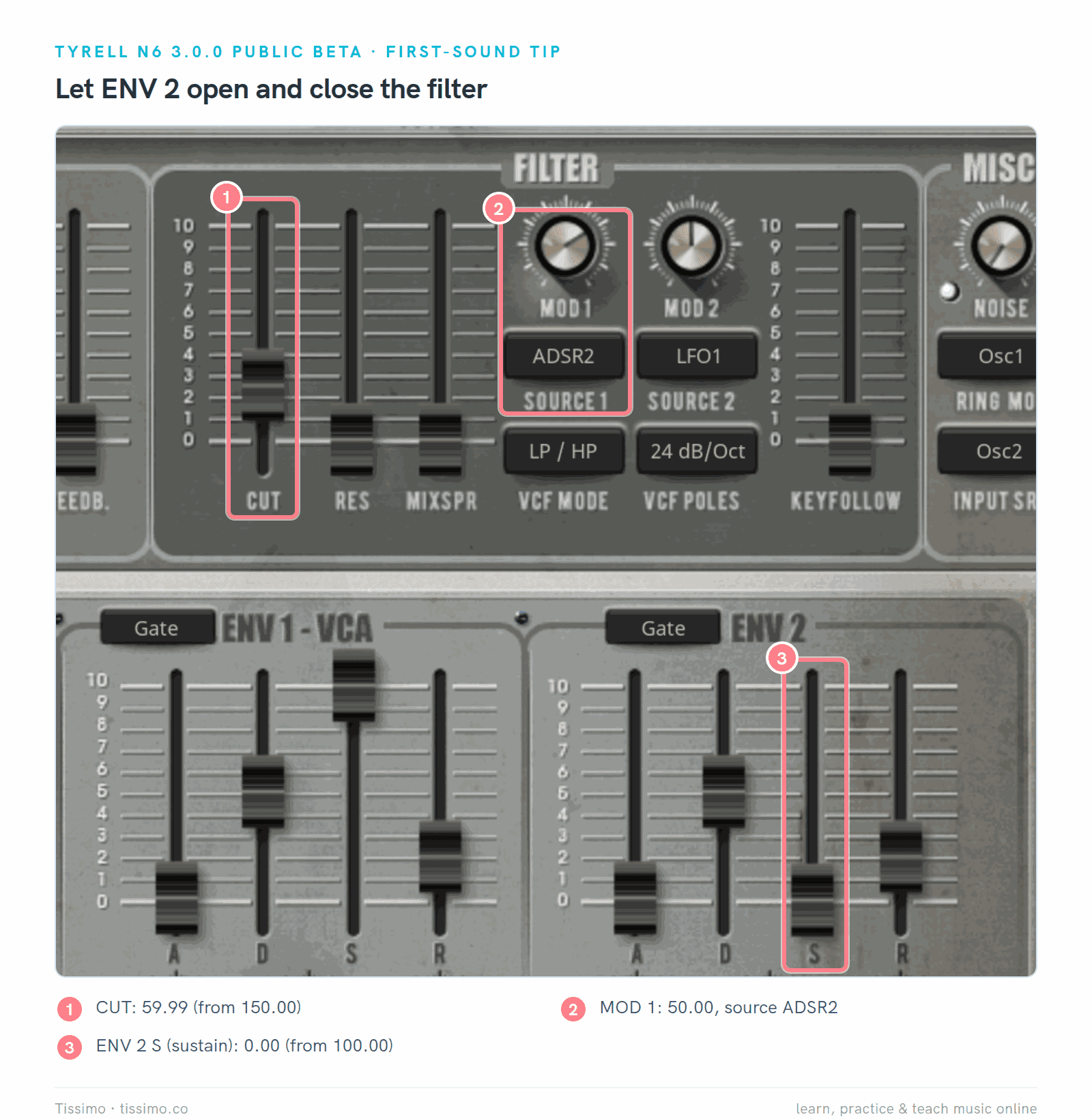
Tyrell N6 3.0.0 public beta with CUT at 59.99 (from 150.00), MOD 1 at 50.00 and ENV 2's sustain at 0.00, as the plugin reports them.
Podolski is the simplest synth here: one oscillator, one filter, one envelope, and an arpeggiator/16-step sequencer, with delay and chorus/flanger. It plays up to 16 voices and has over 300 presets. Version 1.2.3 comes as VST3 and AU on Mac and VST3 and AAX on Windows.
Who it suits: beginners who want the fewest controls, and anyone who likes arpeggios.
Pros: very little to learn, a user guide, and an arpeggiator that gives you moving patterns at once (Arpeggiator Patterns explains order, rate and gate).
Cons: a single oscillator limits thick layered sounds, and u-he lists no CLAP version and, for now, no AAX on Mac.

Podolski 1.2.3: the whole synth on one page. The Arpeggiator and Presets pages open from tabs at the top of the window, above this crop.
First-sound tip: open the PRESETS tab at the top of the window and start from a folder by sound type. Our copy lists 232 presets in Factory 1.0 and 100 in Factory 1.2.

The Presets page: folders on the left, presets in the middle. Click a name to load it.
Zebralette 3 (3.0.0, December 2025) is one oscillator from u-he's Zebra 3 in a small synth: an ADSR, an MSEG (an envelope you draw), two LFOs, a mod matrix, delay and reverb. You can draw a waveform or a spectrum, and render it as a wavetable or additively. Formats: VST3, CLAP and AAX, plus AU on Mac.
Who it suits: sound designers who want to draw their own waveforms.
Pros: a full curve editor and a drawable MSEG on one panel.
Cons: a single oscillator, no separate filter section (filters live in the oscillator FX slots), sample import marked experimental, and it asks for a display of at least 1280 × 1024 pixels.

Zebralette 3 (3.0.0) in its initial patch, a Wavetable-rendered curve in the oscillator.
First-sound tip: hold a note and turn the OSC panel's Curve Morph, beside the curve editor. It blends the initial patch's two curves, a falling ramp and a peak (the thumbnails above the editor), and the plot behind the curve shows the waveform changing.

Curve Morph at 50.00 (from 0.00): the marker above the editor sits halfway between the two curves, and the plot shows the blended waveform.
Which free synth should you start with?
Start with TAL-NoiseMaker or Podolski if you've never programmed a synth: nearly every control is on one page. Move to Surge XT when you want more of everything. Add Dexed for electric pianos, bells and other FM sounds.
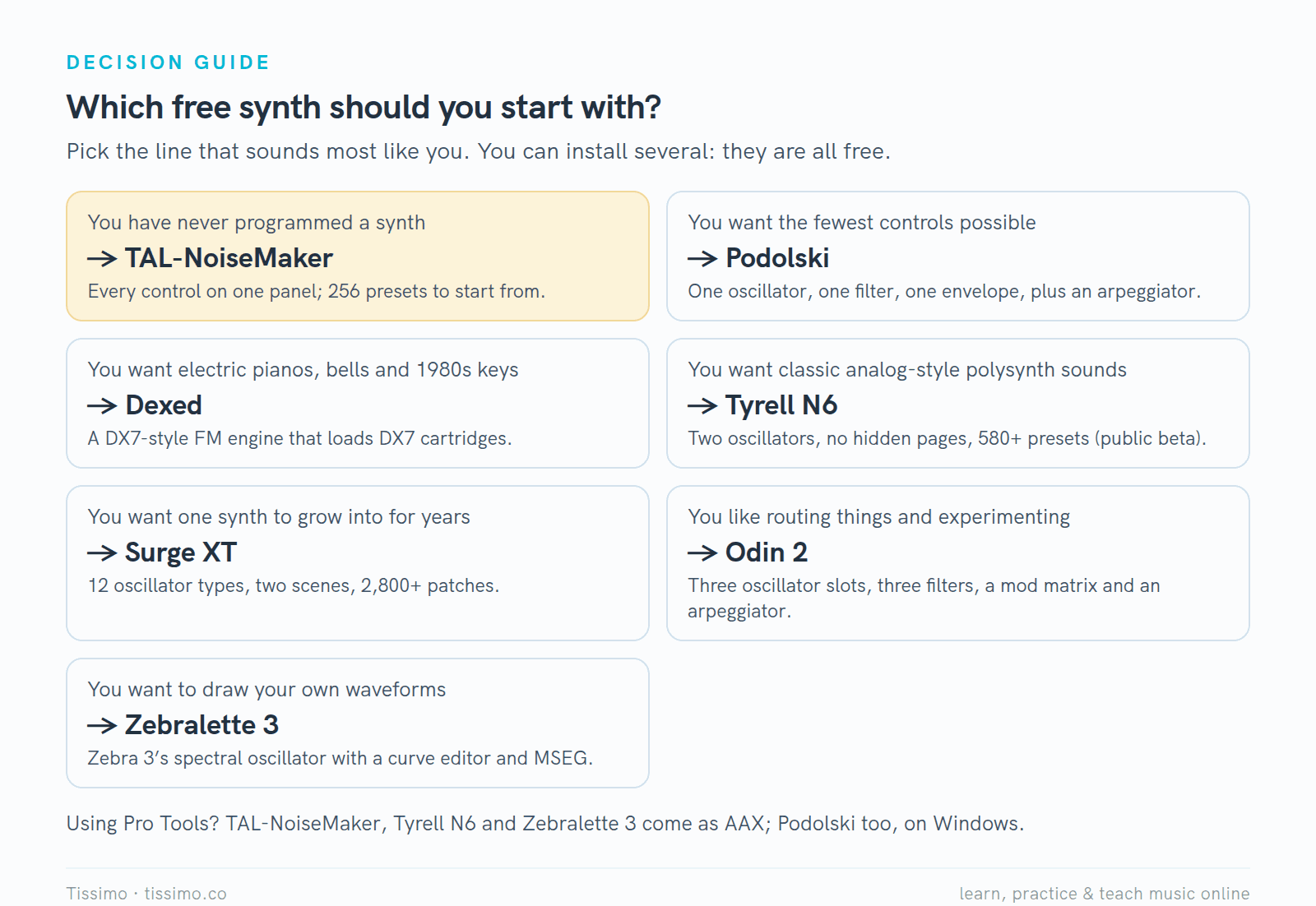
Pick the line that sounds most like you. A footnote lists which ones run in Pro Tools.
Using them in Ableton Live, FL Studio and Logic Pro
Install the format your DAW reads; the VST plugin guide walks through installation.
- Ableton Live 12 loads VST2, VST3 and, on Mac, Audio Units; the manual doesn't list CLAP. Use the VST3 versions. Live's own Drift, a subtractive synth, comes with every edition, and Live Suite also includes Operator (FM), Wavetable and Meld. For a simple bass or pad Drift is often enough; Sound Design in Ableton Live 12 builds a bass with it, then a lead and a pad in Wavetable.
- FL Studio reads VST2, VST3 and CLAP on Windows and Mac, plus AU on Mac; use the VST3 versions. Its own synths include 3x Osc and the preset-based FLEX; Image-Line's edition comparison lists both as included in all editions. Sytrus, a six-operator FM synth, needs Producer Edition or higher.
- Logic Pro loads third-party plugins only as Audio Units, so install the AU version: all seven synths here offer one. Logic's Retro Synth already has Analog, Sync, Wavetable and FM engines, and Alchemy, ES2 and the FM synth EFM1 come with Logic too.
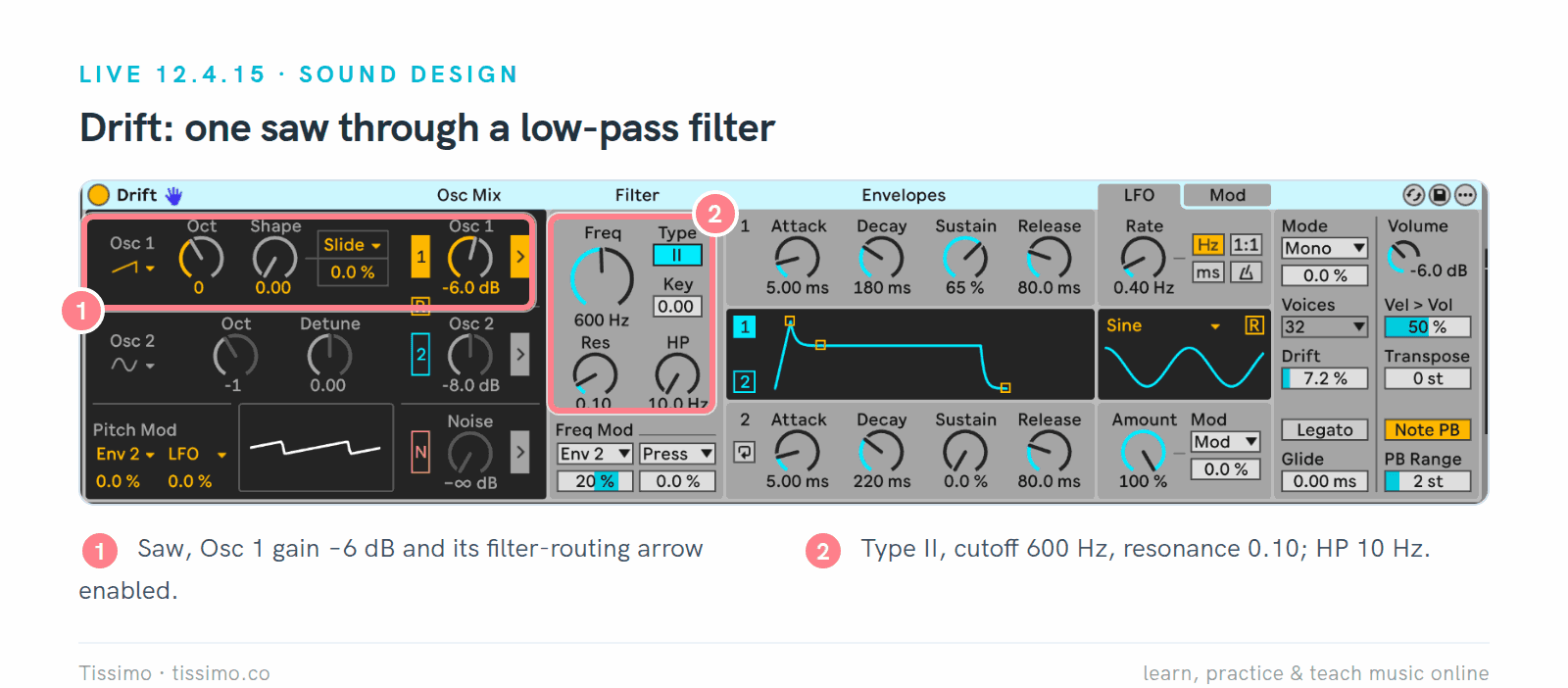
Drift in Live 12.4.15, from our Wavetable and Drift article: one saw through a 600 Hz low-pass filter, the same idea as the TAL-NoiseMaker recipe.
A built-in synth is enough for a basic bass, pad or lead. Reach for a free plugin when you want a sound family the stock synth lacks, such as DX7-style FM, or presets that travel with you between DAWs. For more picks per DAW, see the guides for Ableton Live 12, FL Studio and Logic Pro.
Next steps
Audition presets inside your own music, not on their own: play the same eight bars with three presets and keep the one that fits. Save a changed preset under a new name; Surge XT, TAL-NoiseMaker and the u-he synths have a save button or icon on the panel. Then map one or two knobs to your MIDI keyboard: TAL-NoiseMaker has a MIDI LEARN button and u-he's synths offer MIDI learn too, and MIDI Explained covers what those messages are. Next, the reverb plugin comparison adds space.
If you'd like a guide while you learn, a music production teacher on Tissimo can open these synths with you in a live lesson and build sounds for your own songs.
Free worksheets for this lesson
- Synth Waveforms and Their Harmonics: which harmonics a sine, square, saw and triangle contain, with audio examples to compare.
- Arpeggiator Patterns: Order, Rate and Gate: Up, Down, Up-Down and Input order on one chord, plus rate and gate, for Podolski's or Odin's arpeggiator.
Sources
- Surge XT — Surge Synth Team
- Surge XT downloads — Surge Synth Team
- Surge XT User Manual — Surge Synth Team
- Dexed, FM plugin synth — Digital Suburban
- Dexed releases — GitHub
- Odin 2 Free Synthesizer — TheWaveWarden
- Odin 2 change log — TheWaveWarden on GitHub
- TAL-NoiseMaker — TAL Software
- TAL-NoiseMaker User Guide 1.0 — TAL Software
- TyrellN6 — u-he
- Podolski — u-he
- Zebralette 3 — u-he
- An Introduction to Frequency Modulation, Synth Secrets — Sound On Sound
- Using Plug-Ins, Live 12 Reference Manual — Ableton
- Compare editions — Ableton
- Plugin Standards, FL Studio manual — Image-Line
- FLEX, FL Studio manual — Image-Line
- Sytrus, FL Studio manual — Image-Line
- FL Studio pricing and editions — Image-Line
- Overview of plug-ins in Logic Pro for Mac — Apple
- Retro Synth overview in Logic Pro for Mac — Apple
Read this article online: https://tissimo.co/articles/free-synth-plugins-compared-surge-xt-dexed-odin-2-and-more



Comments