 Back
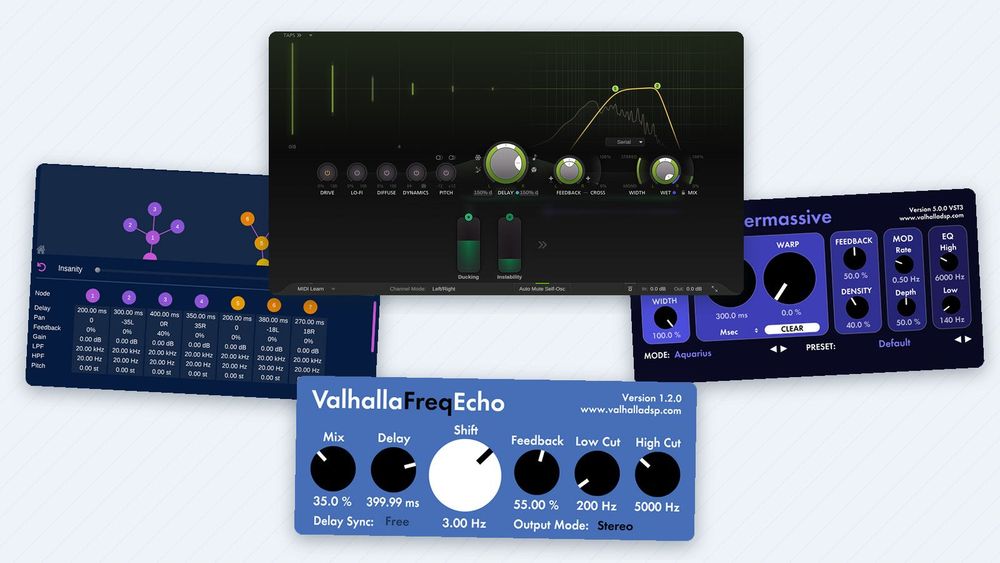
Delay Plugins Compared: FabFilter Timeless 3, Valhalla Freq Echo, ChowMatrix and More, Plus Five Delay Moves
A delay plugin records what you play and plays it back a moment later, once or many times. That simple idea covers a lot of sounds: the quick slap on an early rock vocal, the dotted-eighth echoes under a guitar riff, repeats that bounce from left to right, and one word that echoes into a gap. You don't have to buy anything to get started. Five of the six plugins in this comparison are free, and the one paid plugin, FabFilter Timeless 3, runs as a full 30-day trial.
This guide explains the delay types and controls that matter, shows how to turn a song's tempo into delay times, compares six plugins with real screenshots of each, and then walks through five delay moves on real screenshots, with the settings visible. Versions and prices are as of November 2026.
Delay types and the controls that matter
Every delay starts with a buffer that holds the sound for a set time. Feed part of the delayed signal back into the input and you get a series of repeats, each a little quieter than the last. Paul White points out in Sound On Sound that the feedback gain must stay below unity (each echo quieter than the one before), or the echoes build up instead of dying away.

The core of a delay plugin. Feedback sends part of each echo round again; in ping-pong mode the echoes cross from one side to the other.
The names you'll see describe how a delay colors or places its repeats:
- Digital: clean repeats that sound like the input.
- Tape-style: repeats that darken, saturate and wobble a little, like the tape echo machines they imitate.
- Ping-pong: echoes that alternate between the left and right speakers.
- Multi-tap: several delay times from one buffer, for rhythmic patterns.
- Modulated: a slowly moving delay time that adds chorus-like movement.
- Frequency-shifted: each repeat is moved up or down by a set number of hertz, so the echoes climb or fall; small shifts sound like phasing, large ones turn metallic.
Six controls do most of the work:
- Time and sync. Milliseconds, or a note value that follows the song's tempo.
- Feedback. How many repeats you hear before they fade out.
- Filters. Low cut and high cut on the repeats. Inside the feedback loop, each repeat gets thinner or darker than the one before.
- Modulation. A slow change of the delay time, for movement or a tape wobble.
- Ducking. Turns the echoes down while you play or sing and lets them come back in the gaps.
- Mix. The balance between the dry signal and the echoes; 100% wet when the delay sits on a return track (a send or aux track in other DAWs).
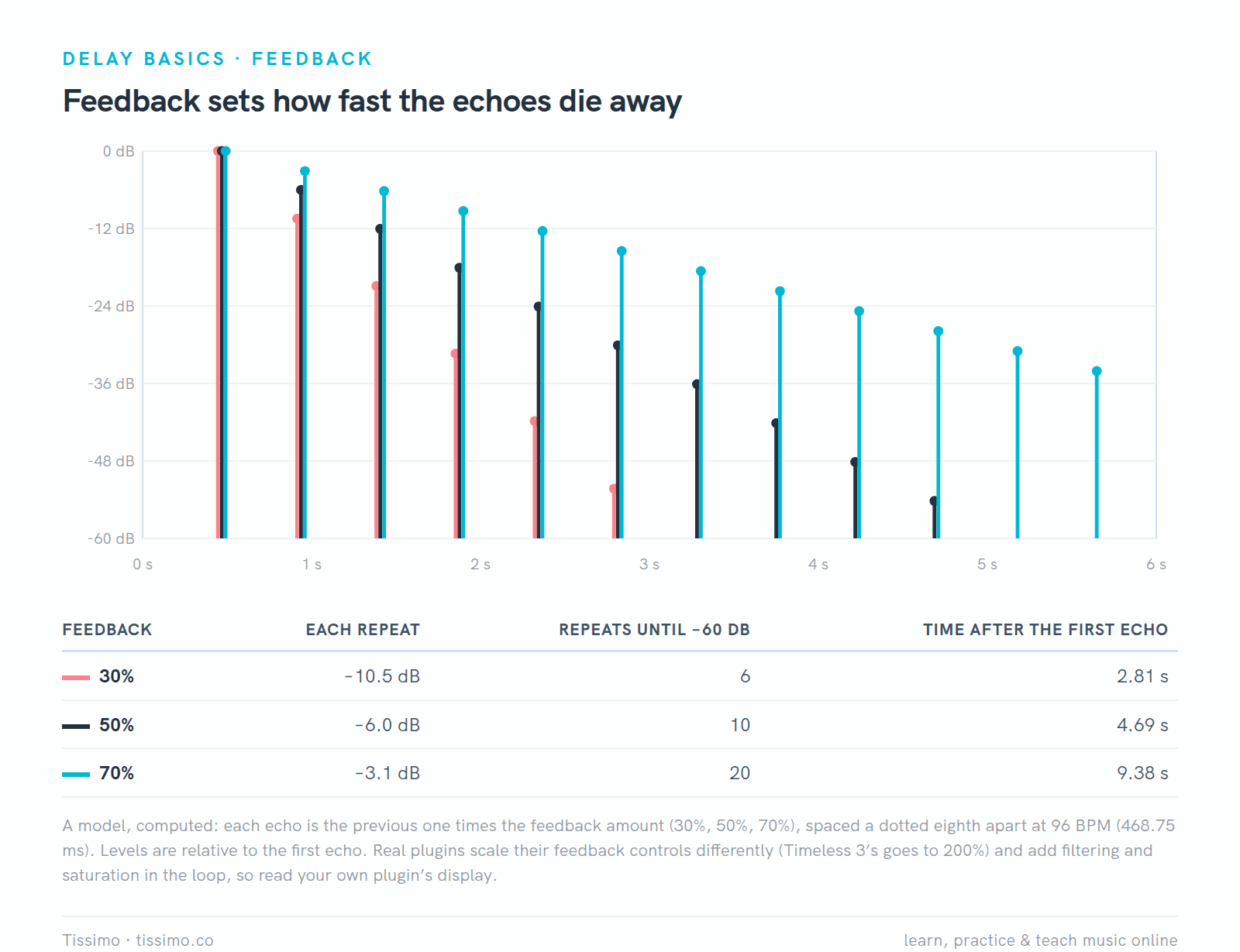
A model of feedback: at 50%, each echo is 6 dB quieter than the one before, so it takes about ten repeats to fade 60 dB. Plugins scale their feedback controls differently.
Delay times that fit the beat
A minute has 60,000 milliseconds, so one beat (a quarter note, as in 4/4) lasts 60,000 ÷ BPM. At 96 BPM that is 625 ms. Multiply by the note's length in beats: an eighth note is half a beat (312.5 ms), a dotted eighth three quarters of a beat (468.75 ms), and an eighth-note triplet a third of a beat (208.33 ms). Our Tempo Math: Beats, Bars and Delay Times worksheet drills this math for quarters, eighths, sixteenths and dotted eighths, with listening examples.
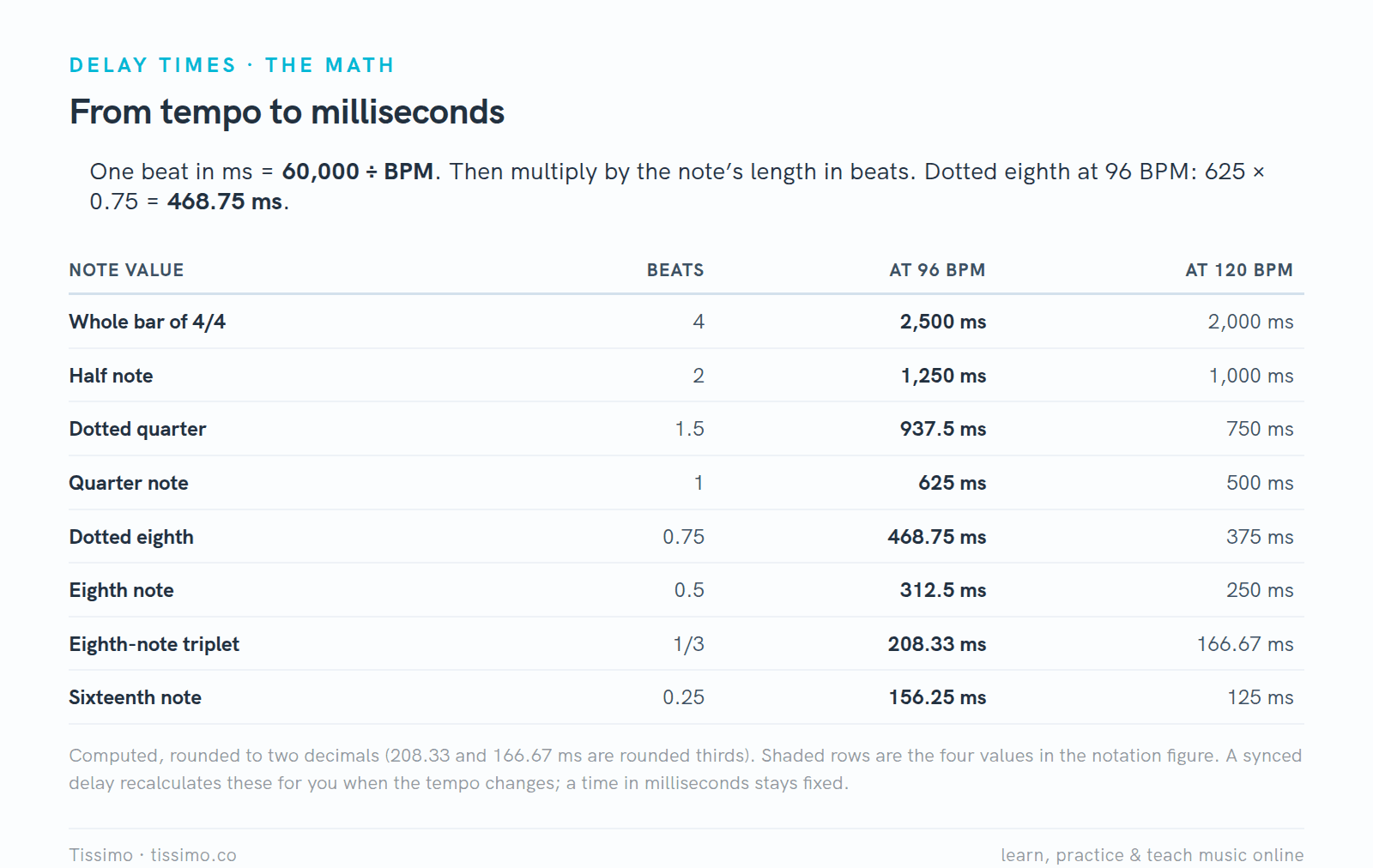
From tempo to milliseconds. The 120 BPM column matches the worked example on the Tempo Math worksheet.
Here are four note values you will use often, engraved against a steady beat. If the dotted eighth is new to you, the Dotted Eighth + Sixteenth handout explains why it lasts three quarters of a beat, and Triplets covers three even notes in one beat.
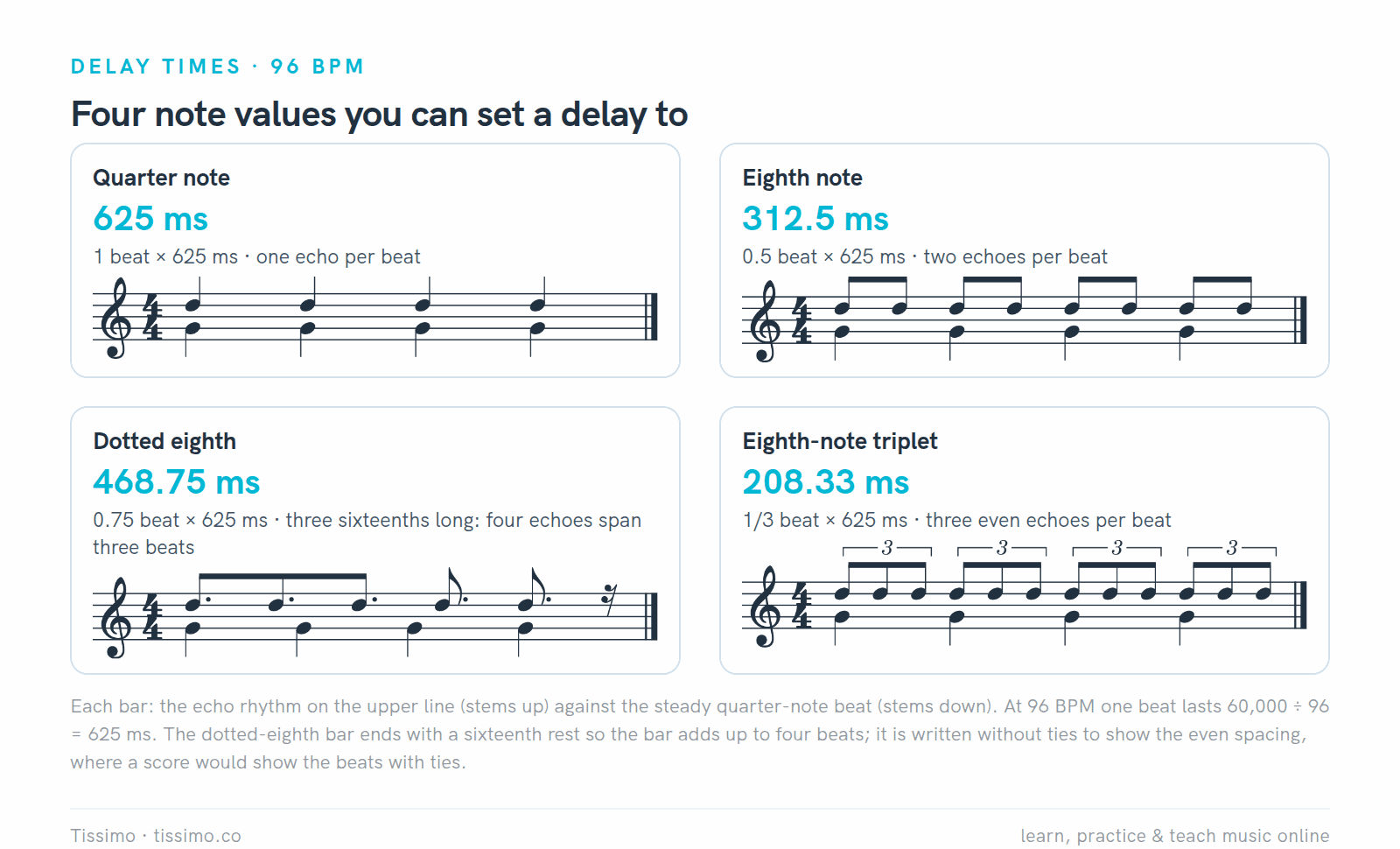
The echo rhythm (stems up) against the beat (stems down) at 96 BPM. Four dotted eighths span exactly three beats, so each echo lands on a different part of the beat: on 1, the "a" of 1, the "&" of 2, the "e" of 3, then on 4.
A synced delay redoes this math whenever the tempo changes. Typing milliseconds is just as exact, but the value stays fixed if the song speeds up.
The six delays, one by one

The six plugins side by side, from each developer's own pages on November 20, 2026. Timeless 3, Freq Echo and Supermassive have no Linux version; only Timeless 3 costs money.
FabFilter Timeless 3: the paid all-in-one
Timeless 3 (version 3.10) is FabFilter's tape-style delay. It lists at $149, and the download runs as a fully functional 30-day trial. The signal passes through five optional effects (Drive, Lo-Fi, Diffuse, Dynamics, Pitch) and up to six filters, then back to the input through the feedback loop. You also get up to 16 delay taps, ping-pong modes, freeze, mid/side processing and a modulation system with LFOs, envelope followers and XY controllers. Formats: VST2, VST3, AU, CLAP and AAX, for Windows and macOS.
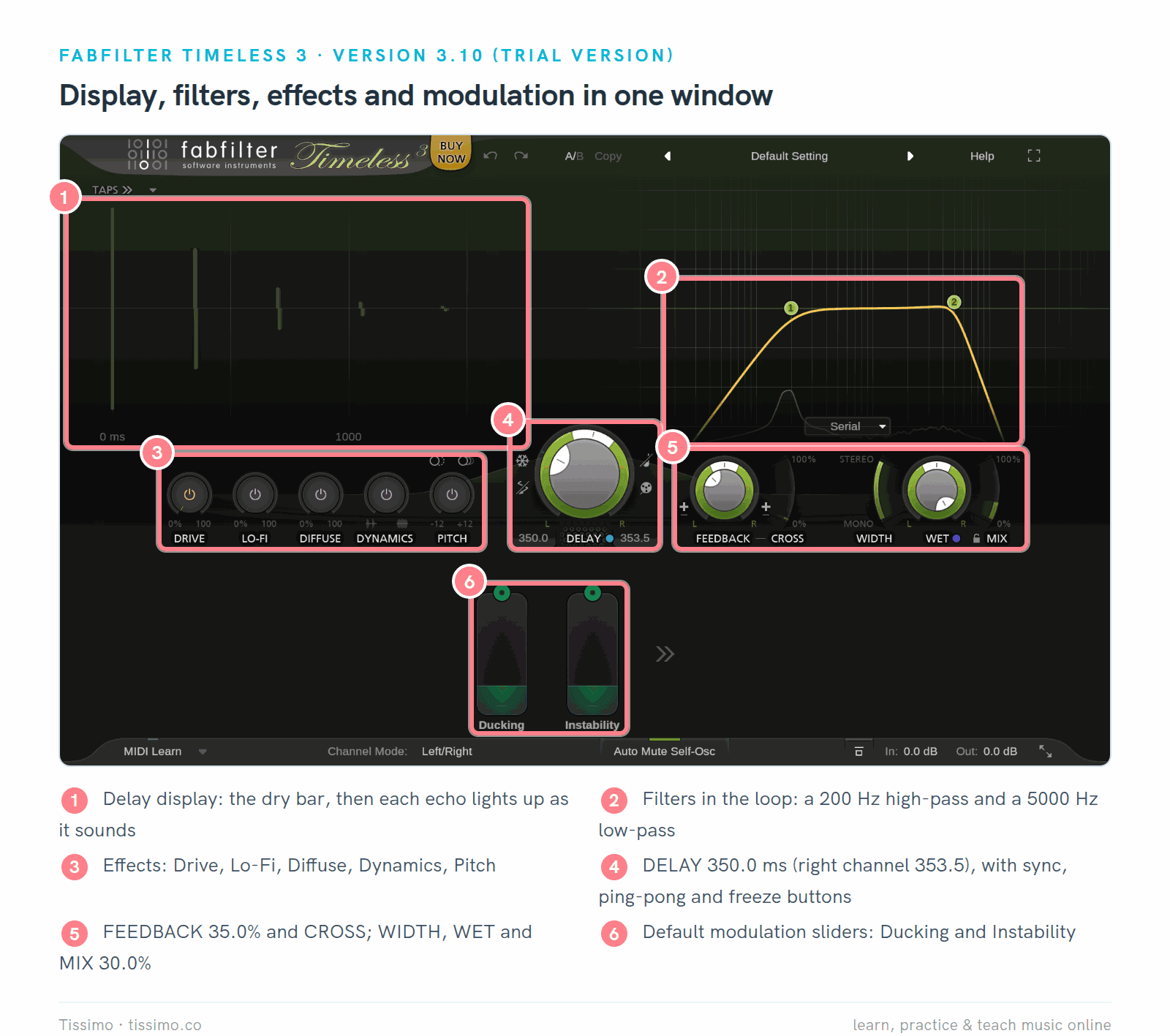
Timeless 3.10 (trial) in its Default Setting: delay 350.0 ms, feedback 35.0%, a 200 Hz high-pass and a 5000 Hz low-pass in the loop, mix 30.0%. The echoes light up in the display (1).
- Pros: you see the echoes and the filters you set; tape or time-stretch behavior when you change the time; the default setting already includes Ducking and Instability sliders; a Lock Mix button for return tracks.
- Cons: $149 after the trial; no Linux version; a deep modulation system (a 50-slot matrix with XLFOs, envelope generators and followers, XY controllers and MIDI sources) that takes time to learn.
- Suits: anyone who mixes often and wants synced echoes, ping-pong, filtered feedback and ducking in one window.
Valhalla Freq Echo: free, with a frequency shifter
Freq Echo is a free Bode-style frequency shifter combined with an analog echo emulation. Its window has six knobs. Production Expert describes the low-cut and high-cut filters and the shifter as sitting in the feedback path, so with a little Shift each echo is moved further up or down in frequency. At 0 Hz Shift it works as a plain echo. Delay Sync switches the time from free milliseconds to note values of the song's tempo, dotted and triplet ones included. Formats: VST2, VST3 and AAX on Windows (version 1.2.0), plus AU on the Mac (1.2.8).
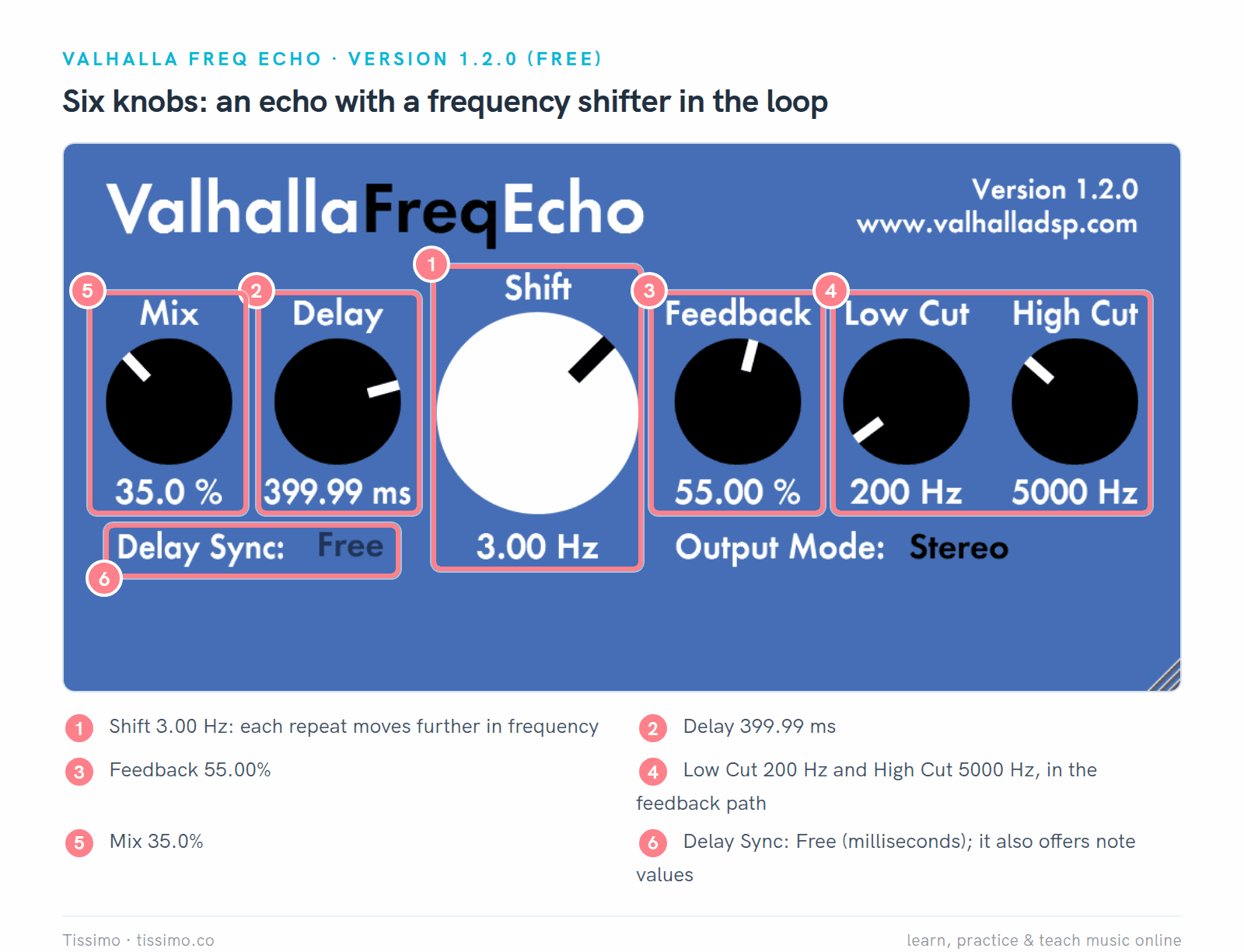
Freq Echo 1.2.0: Delay 399.99 ms, Feedback 55.00%, and Shift at 3.00 Hz (1), so every repeat is shifted again on its way round.
- Pros: free, no account; six knobs, quick to learn; tempo sync with dotted and triplet values; effects from subtle chorusing to endless glissandos, as Valhalla's page lists; Low Cut and High Cut in the loop.
- Cons: no Linux version; no ping-pong or tap pattern; the controls are explained in tooltips rather than a manual.
- Suits: dub-style echoes and sound design, and a plain filtered echo when Shift sits at 0 Hz.
ChowMatrix: a tree of delays
ChowMatrix 1.3.0, from Chowdhury DSP, is free and open source (BSD license). Instead of one delay line it builds a tree: each node is a delay with its own time, pan, feedback, filters, distortion, pitch and modulation, and passes its signal on to child nodes. Dragging a node changes its time (distance from its parent) and pan (angle). It runs on Windows, macOS and Linux as VST2, VST3, AU, LV2 and AAX. The latest release dates from December 2021.
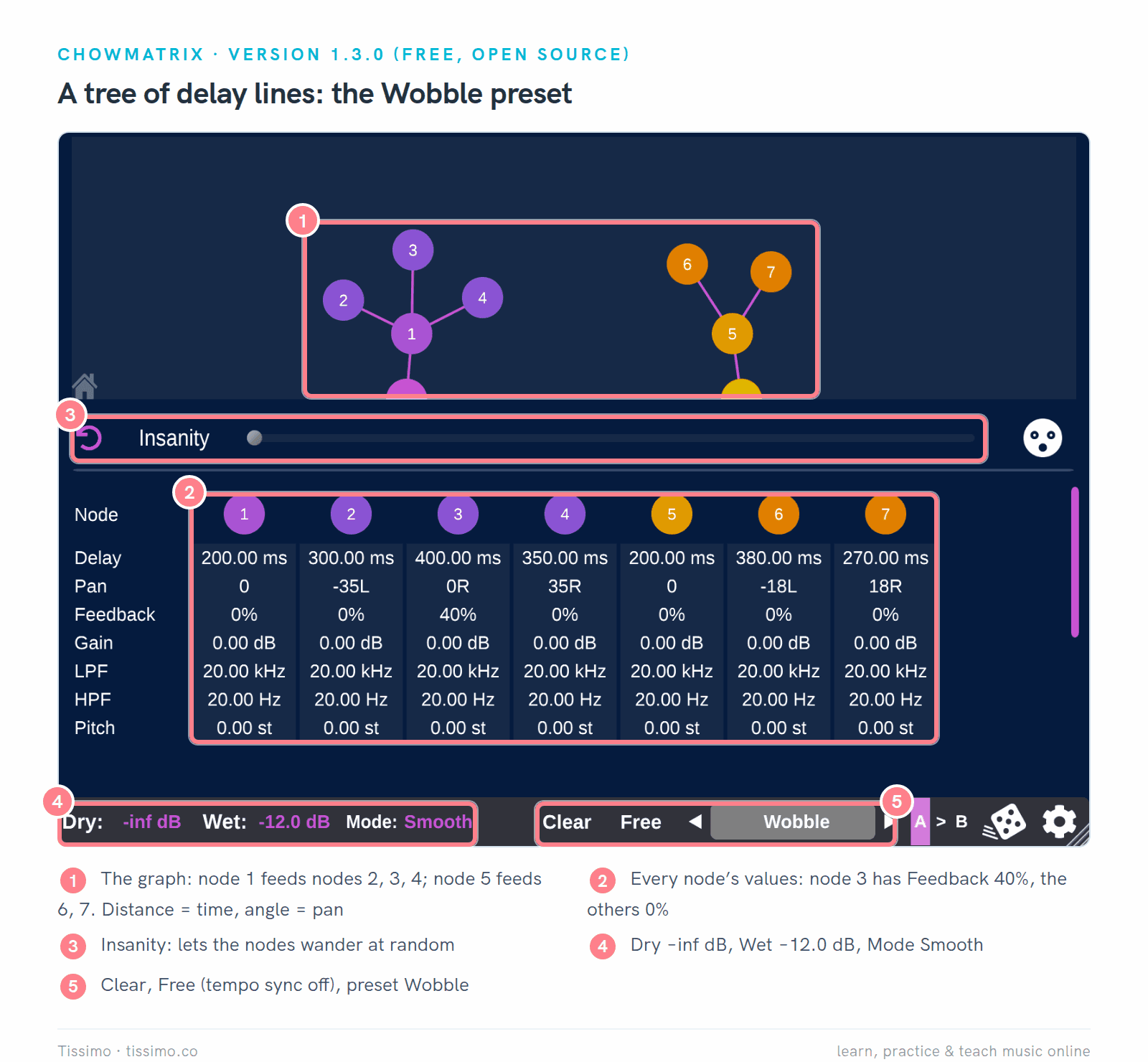
ChowMatrix 1.3.0 with the factory preset Wobble. Node 1 (200.00 ms) feeds nodes 2, 3 and 4 (300, 400 and 350 ms); node 3 alone has feedback, 40% (1, 2).
- Pros: free on all three systems; multi-tap patterns you design by dragging; filters in each node's loop; a Sync/Free switch; Insanity and the Randomise button for happy accidents.
- Cons: an unusual layout that takes a while to read; creating a node needs Shift-click; no release since December 2021 and no CLAP version.
- Suits: curious producers who want rhythmic multi-tap echoes or ambient textures.
Surge XT Effects: the Delay
Surge XT is a free, open-source synth (GPL-3.0), and Surge XT Effects (1.3.4) is its effects section as a separate plugin. Its Delay has separate left and right times that can be tempo-synced, feedback and crossfeed (feedback into the opposite channel, which bounces echoes between the sides), low and high cut, an LFO for modulation, width and mix. It installs as VST3 and CLAP on Windows, as VST3, CLAP and LV2 on Linux, and adds AU on the Mac.
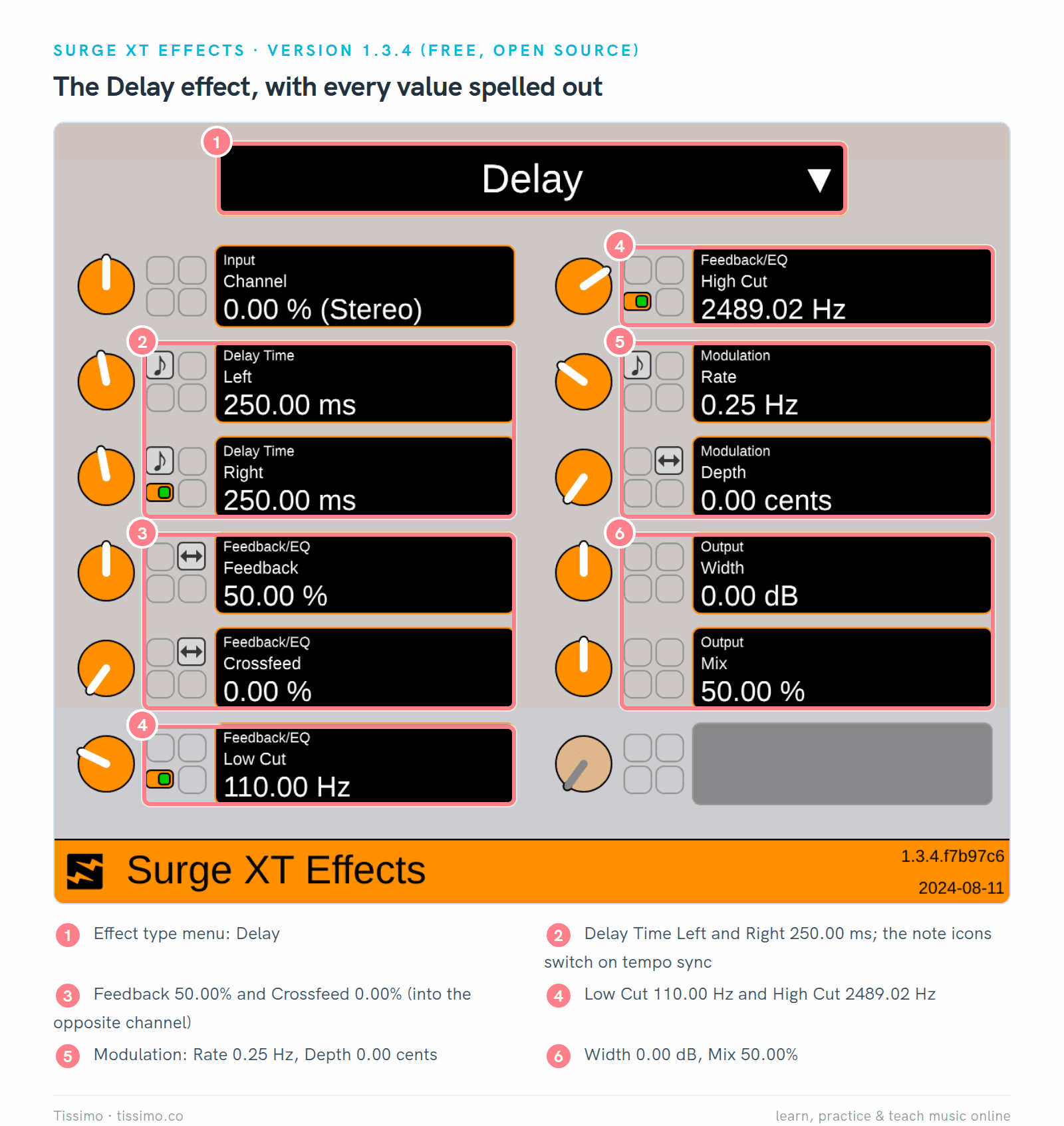
Surge XT Effects 1.3.4 with its default Delay: 250.00 ms on both sides, Feedback 50.00%, Low Cut 110.00 Hz and High Cut 2489.02 Hz. The note icons (2) switch a time to tempo sync.
- Pros: free on all three systems, with a CLAP version; clear labels with exact values; a menu at the top switches to Surge's other effect types.
- Cons: no display of the echoes; tempo sync and other options sit in small buttons and menus.
- Suits: anyone who wants a plain stereo delay with exact values at no cost.
Valhalla Supermassive: echoes that turn into space
Supermassive 5.0.0 is free and is covered as a reverb in our reverb plugins comparison. Several of its 22 modes are delays at heart. Valhalla says Virgo "basically sounds and behaves like a stereo delay until the Density control is turned up", and Aquarius is an "EchoVerb" with a strong echo that becomes a reverb as Density rises. Delay can be set in milliseconds or synced as notes, dotted or triplets. Formats: VST2, VST3 and AAX on Windows, plus AU on the Mac.

Supermassive 5.0.0 in Aquarius: Delay 300.0 ms and Density 40.0% (1, 2), so a clear echo sits inside a growing reverb.
- Pros: free; delays and reverbs in one plugin; tempo sync with dotted and triplet values; a MIX lock for return tracks.
- Cons: no Linux version; no separate left and right times; the modes behave very differently, so expect to explore.
- Suits: pads, vocals and guitars that need echoes melting into space.
Airwindows Consolidated: TapeDelay2 and PitchDelay
Airwindows Consolidated puts every Airwindows effect into one free, open-source plugin (VST3, CLAP, AU and LV2, for Windows, macOS and Linux), with each effect's documentation beside its controls. Two of its delays sit in the Ambience category: TapeDelay2, "a flexible tape echo", and PitchDelay, the same design with pitch shift instead of flutter. TapeDelay2's controls run from 0 to 1, without milliseconds.

TapeDelay2 in Airwindows Consolidated: Regen 0.4000 (3) for a few repeats. The developer notes that a Dry/Wet of 0.5 already means full dry and full wet; the default 1.0000 is the wet end of the control, a fit for a return track (5).
- Pros: free on all three systems; six controls; flutter that follows the input level; documentation built in.
- Cons: no tempo sync and no time in milliseconds; releases are dated builds that change with every new Airwindows effect, not numbered versions.
- Suits: a quick tape echo when you'd rather listen than read numbers.
Five delay moves, with the settings on screen
Treat each value below as a starting point. Set the move, then judge it with the whole song playing, not soloed.
1. A slapback
A slapback is a single, short repeat. Julian Rodgers writes in Sound On Sound that slap times commonly fall between about 80 and 150 ms and that slap usually isn't tempo-synced. Set feedback to zero for one repeat. Geoff Smith, also in Sound On Sound, suggests rolling off a little top end for a tape-like sound.
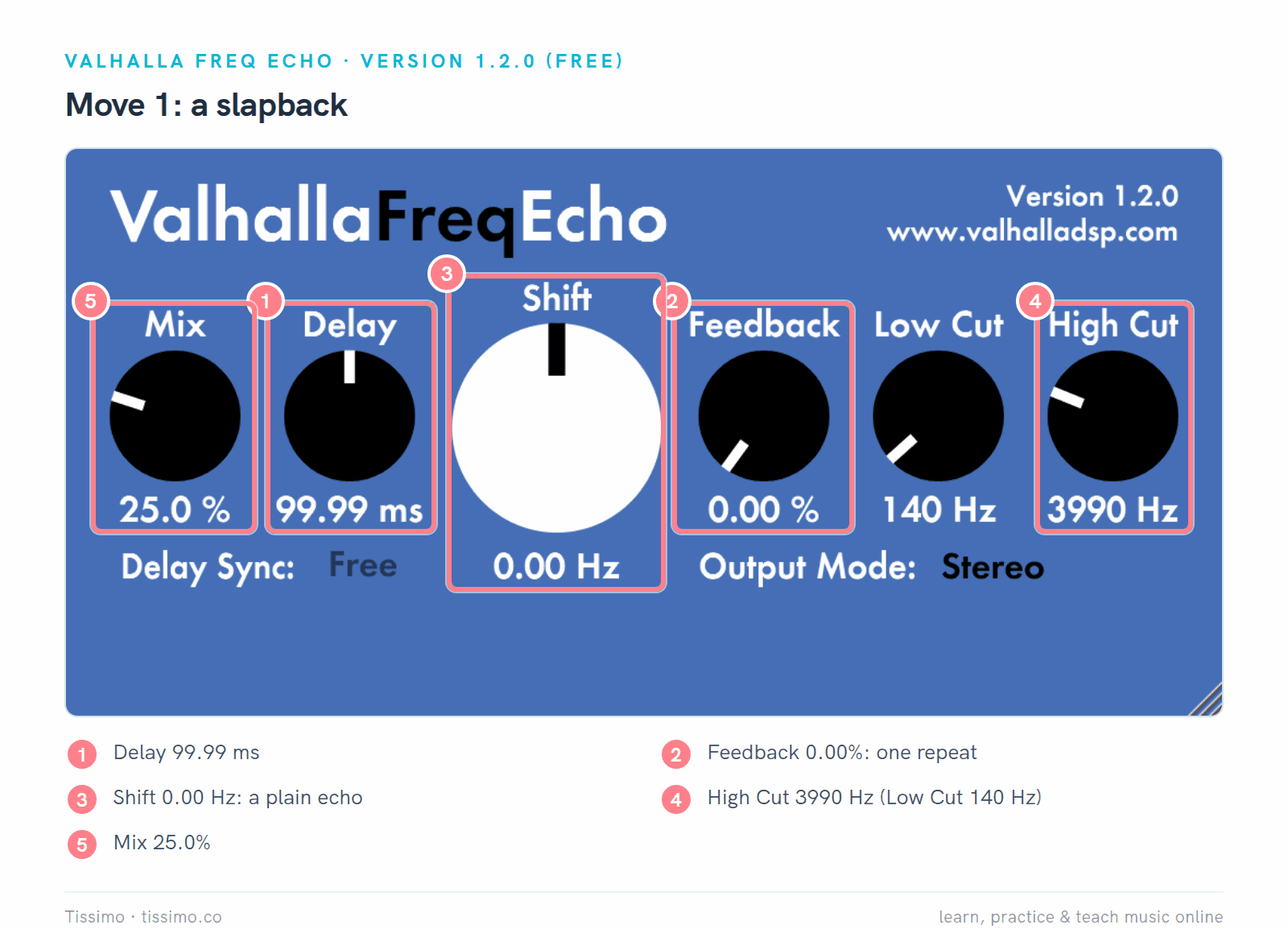
Freq Echo as a slapback: Delay 99.99 ms, Feedback 0.00% and Shift 0.00 Hz (1–3), with High Cut 3990 Hz and Mix 25.0% (4, 5).
2. A dotted eighth at the song's tempo
At 96 BPM a dotted eighth is 468.75 ms. Smith notes that the delay most associated with U2 guitarist the Edge is a dotted eighth of the song tempo. In Timeless 3, switch Delay Sync to 1/8 Note and set the offset to 150% (dotted); the plugin then follows your DAW's tempo. In a plugin without sync, set the time to 468.75 ms, or as close as the control allows.
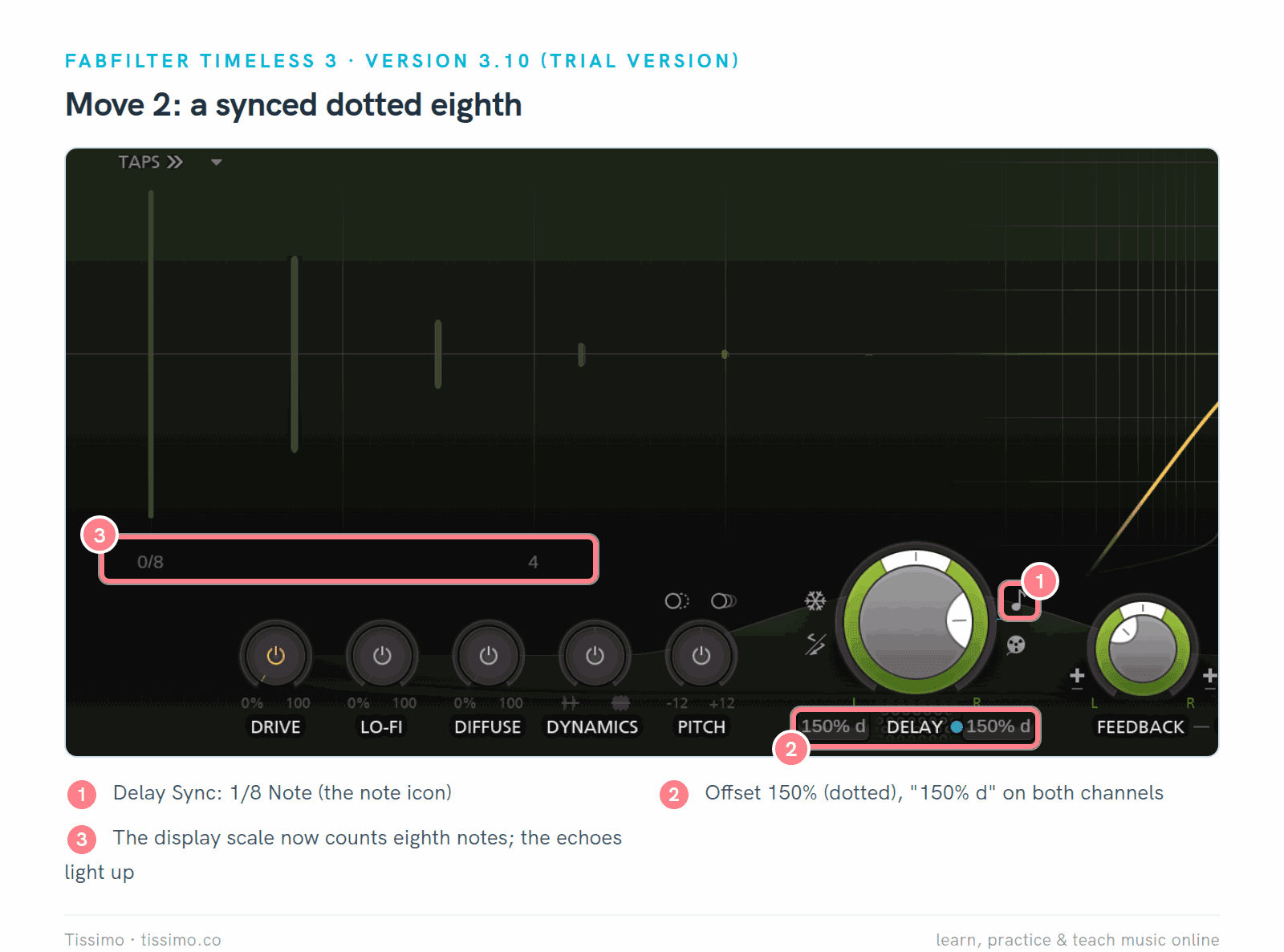
Timeless 3 synced: 1/8 Note at 150% (dotted), "150% d" on both channels (1, 2). The display now counts in eighth notes (3).
3. Ping-pong for width
Ping-pong sends the first echo to one side and the next to the other. In Timeless 3's ping-pong mode, the manual says, "only one channel is fed, and only cross feedback is applied." Very short side-to-side delays used only to widen a part are another matter: Smith warns they can cause comb filtering when the mix is summed to mono, so check in mono.
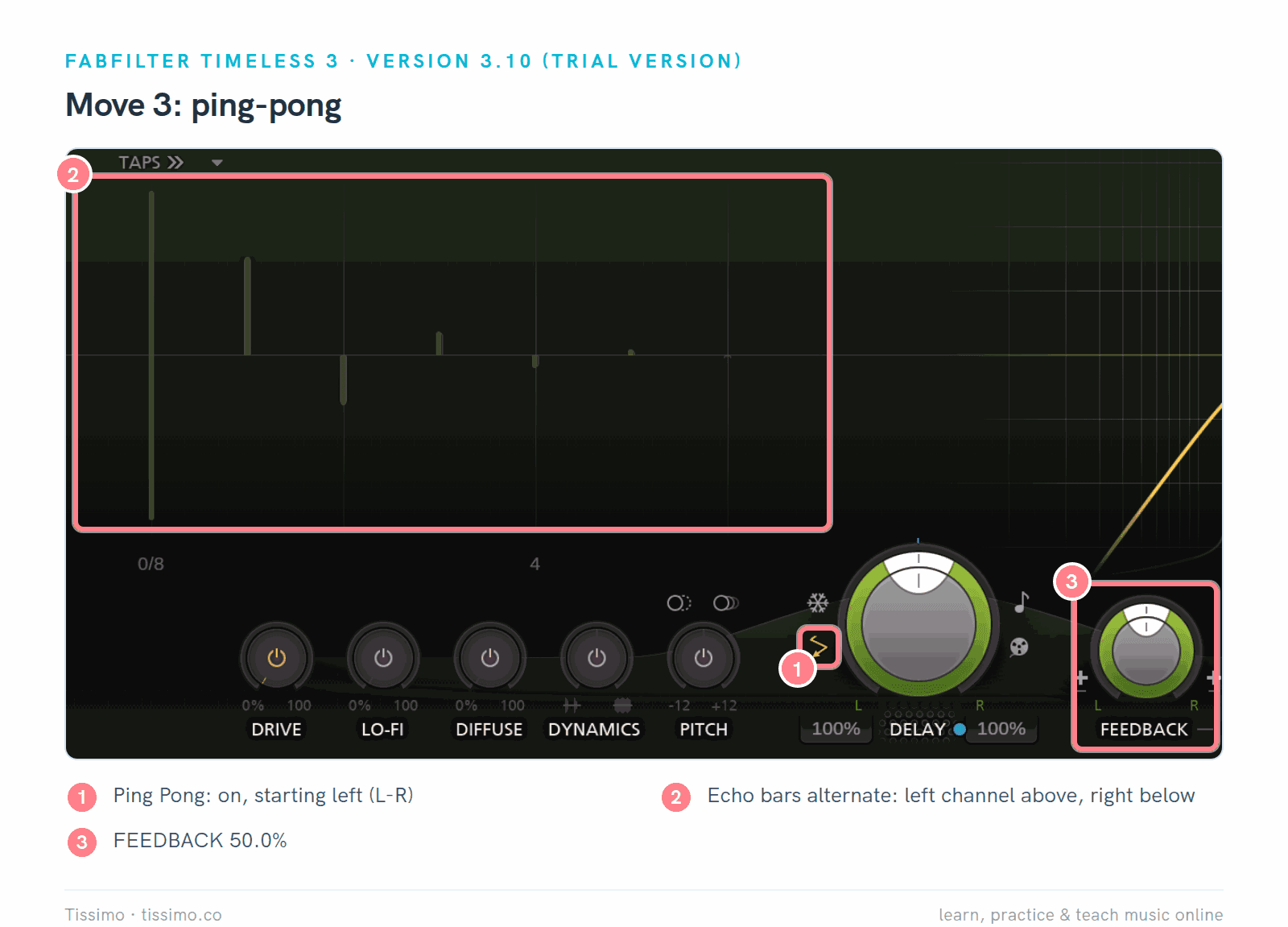
Timeless 3 in ping-pong mode, starting left (1), synced to 1/8 Note at 100%, feedback 50.0% (3). The echo bars alternate above (left) and below (right) the center line (2).
4. Filtered feedback that stays out of the way
A bright, full-range echo competes with the part it repeats. Julian Rodgers suggests a low-pass filter on the repeats; where the plugin offers it, the filter can sit inside the delay's feedback loop "so each generation gets a little darker". He adds a high-pass to stop low-mid muddiness from building up. Ducking helps too: it keeps the echoes down while the part plays and lets them rise in the gaps.
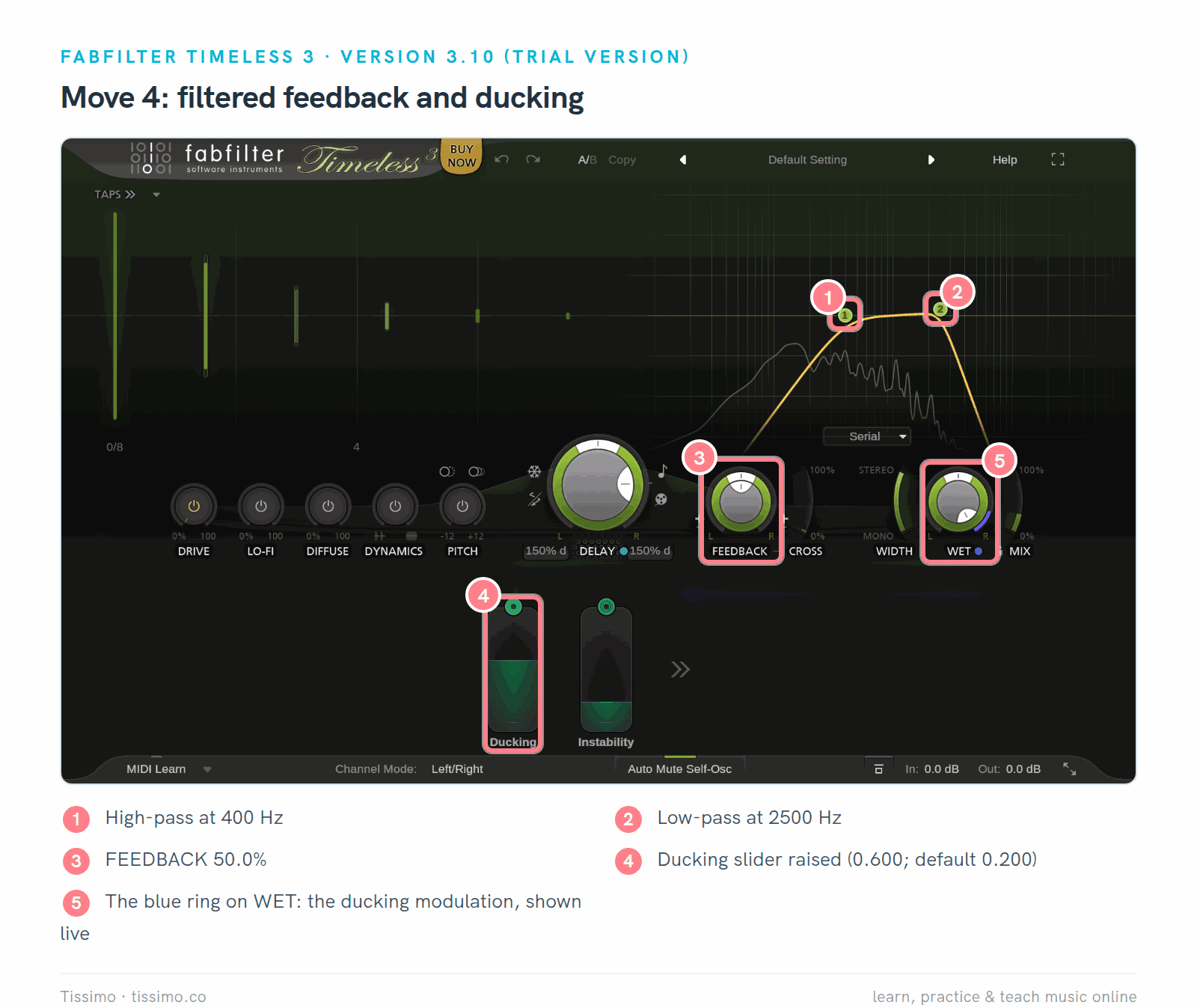
Timeless 3 with the filters at 400 Hz and 2500 Hz (1, 2), feedback 50.0% (3) and the Ducking slider raised from 0.200 to 0.600 (4). The blue ring on WET shows the ducking modulation (5).
5. A delay throw
A throw echoes one word or note instead of a whole part. Put the delay on a return track at 100% wet (our Ableton mixing article sets one up step by step), keep the track's send down, and raise it only for the word you want to echo. Smith suggests automating the send rather than the return when several tracks share one delay.
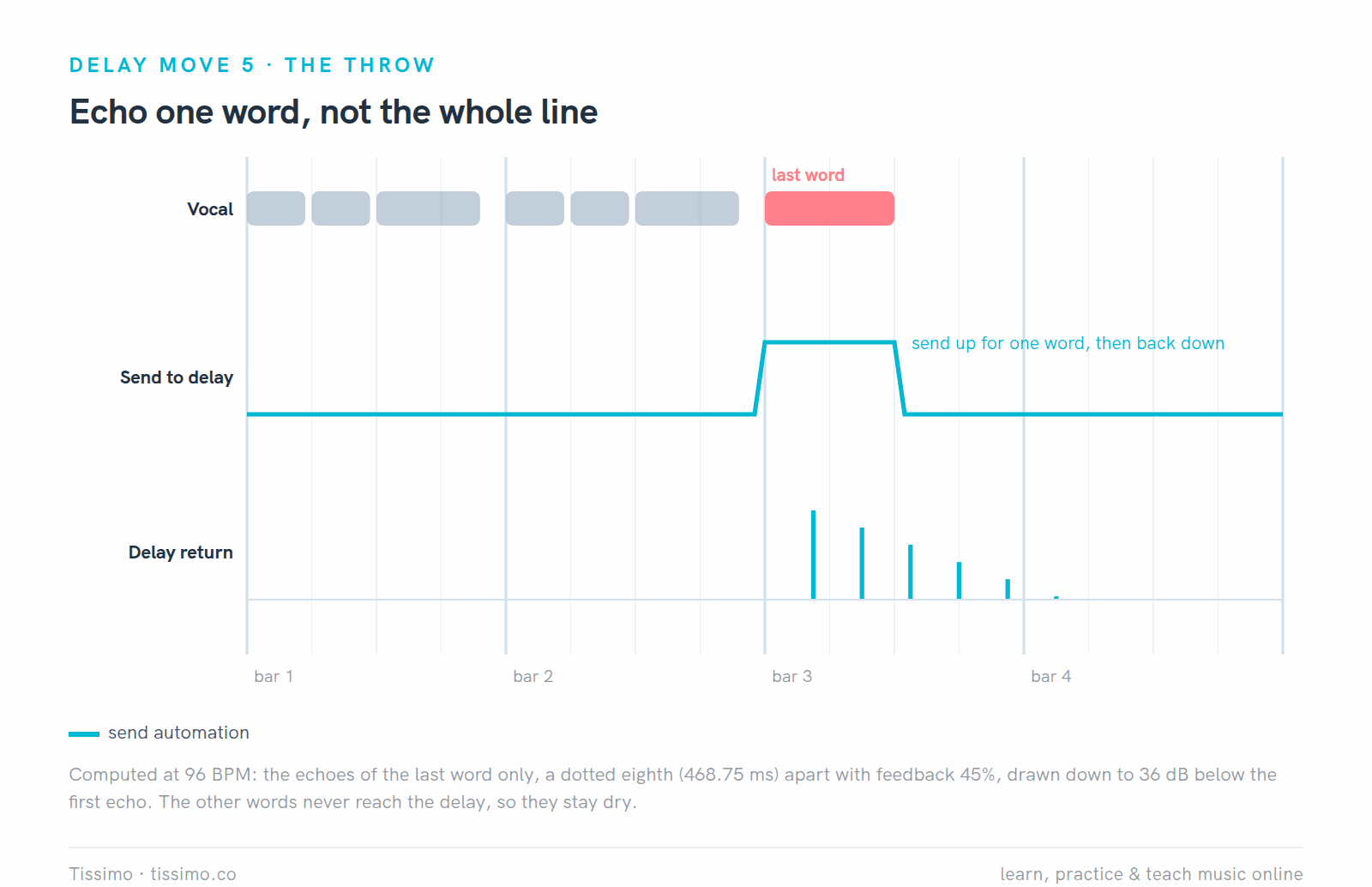
A throw at 96 BPM: the send rises for the last word only, so only that word echoes, a dotted eighth apart.
Supermassive in Virgo mode makes a handy throw delay: at Density 0% and Warp 0%, as here, it behaves like a stereo delay, and Valhalla lists filtering in the feedback loop for this mode. Clicking the MIX label locks the mix at its current value, here 100% wet, while you try presets.
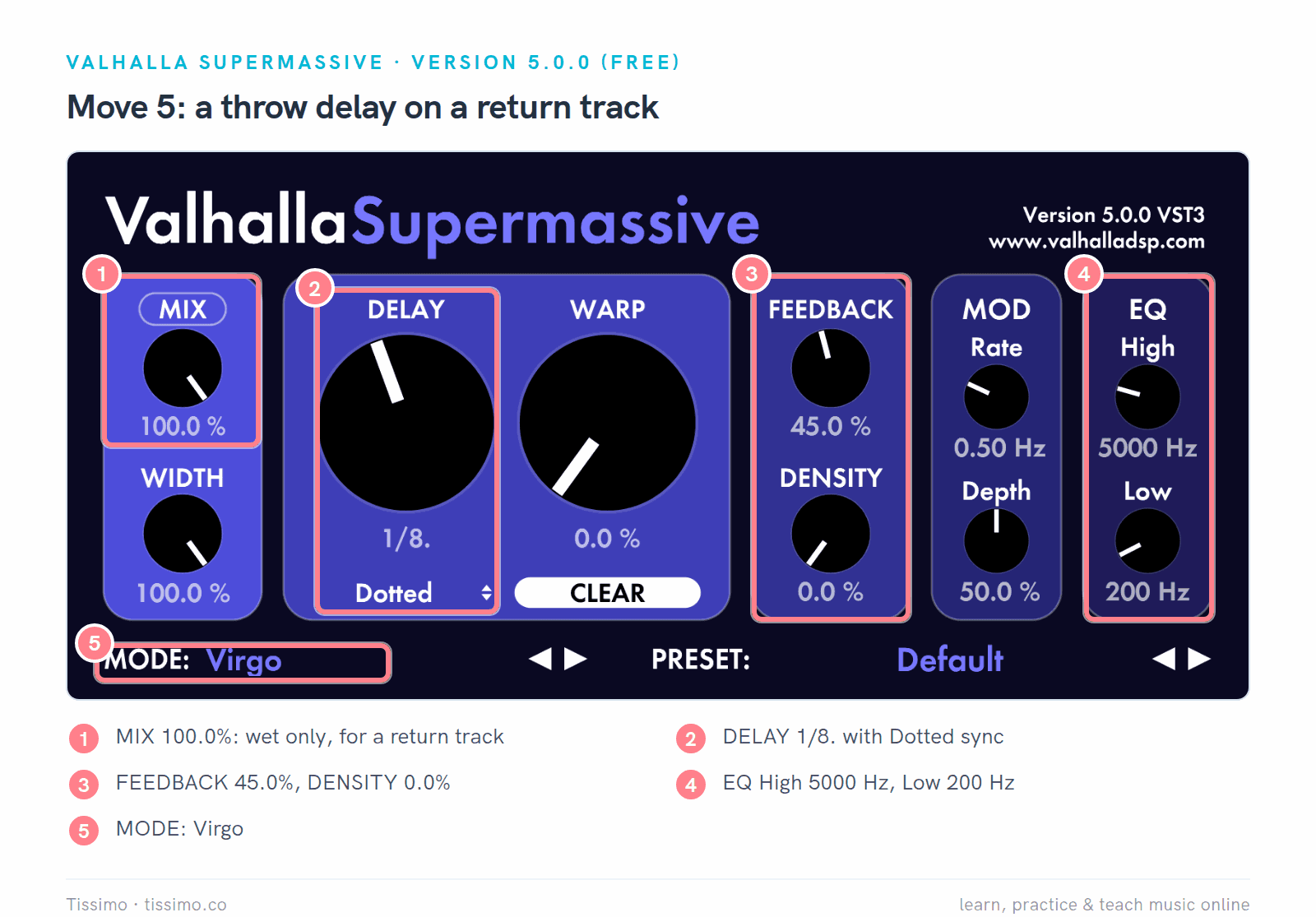
Supermassive in Virgo (5) on a return: Mix 100.0% (1), Delay 1/8. with Dotted sync (2), Feedback 45.0% and Density 0.0% (3), EQ High 5000 Hz and Low 200 Hz (4).
Using them in Ableton Live, FL Studio and Logic Pro
Each DAW loads certain plugin formats only. Our guide to VST plugins and how to install them covers the installation steps.
- Ableton Live 12 loads VST2, VST3 and, on the Mac, Audio Units, so all six plugins here work through their VST3 or AU versions. Live's own Delay, included in every edition, offers Sync or Time, a filter, LFO and a Ping Pong switch; Echo, which comes with Live Suite, adds Stereo, Ping Pong and Mid/Side modes, dotted and triplet sync, noise, wobble and ducking.
- FL Studio loads VST2, VST3 and CLAP, plus AU on the Mac, so all six work here too. Its Fruity Delay 3 has tempo sync, Mono, Stereo and Ping pong models, a filter inside the feedback loop, modulation, diffusion and saturation.
- Logic Pro uses Audio Units for third-party plugins, so install the AU versions; Timeless 3, Freq Echo, ChowMatrix, Surge XT Effects, Supermassive and Airwindows Consolidated all offer one. Logic's Stereo Delay has separate left and right times and crossfeed, Tape Delay has filters in its feedback loop, and Delay Designer offers up to 26 taps.
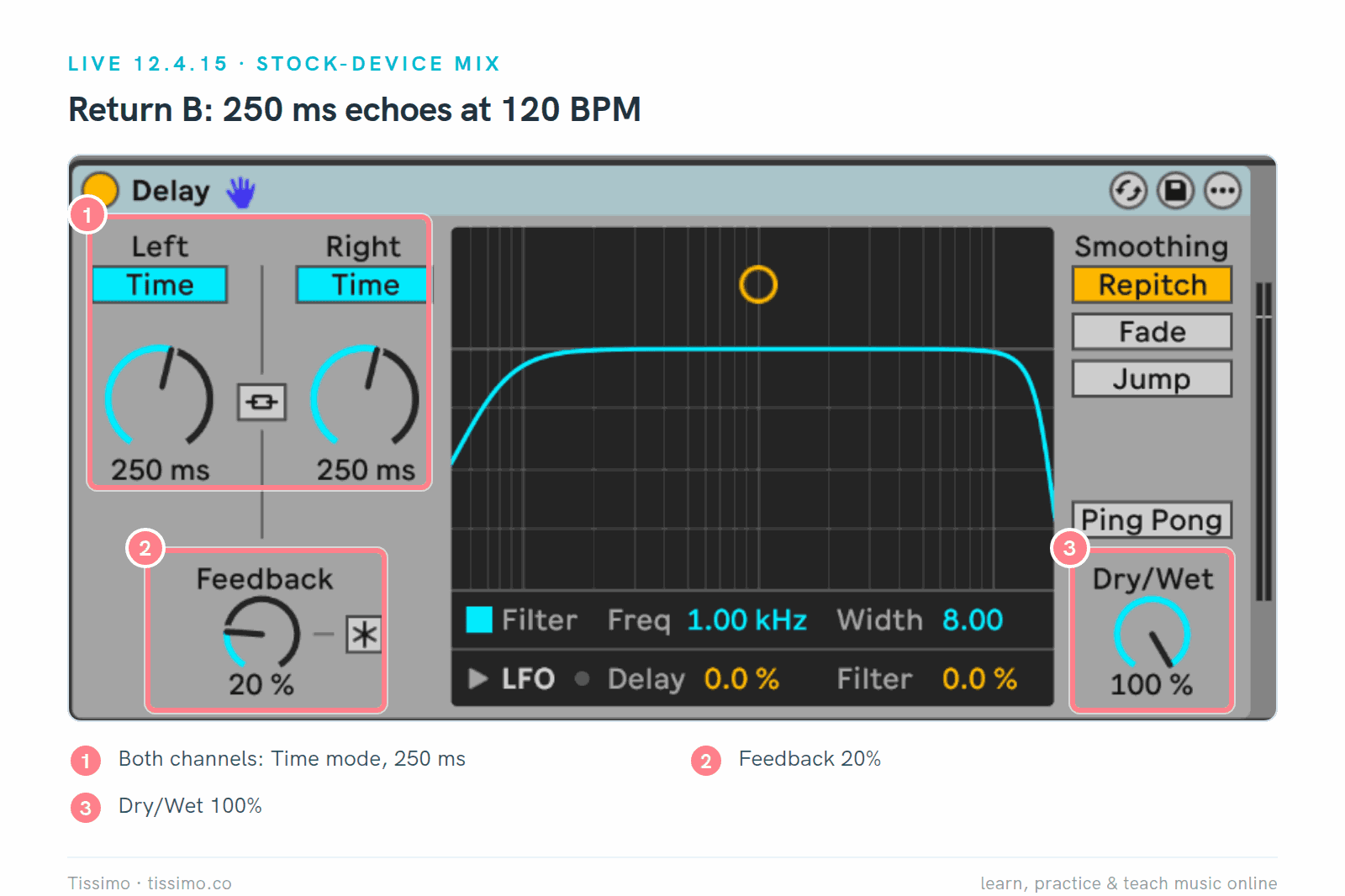
Live's Delay in Live 12.4.15, from our Ableton mixing article: 250 ms on both channels (an eighth note at that project's 120 BPM, as in the table above), Feedback 20%, Dry/Wet 100% on a return track.
When is the built-in delay enough? For the five moves above, in all three DAWs: each offers tempo sync, filters, ping-pong or crossfeed, and a dry/wet control. Only ducking needs a second step outside Live's Echo: put a compressor after the delay and key it from the dry track, as Smith describes. Add a plugin for a workflow you prefer, a tree of taps, echoes that bloom into reverb, or a frequency-shifted echo if your DAW has none (Live's Shifter, in Standard and Suite, has a delay with feedback of its own). Our Ableton mixing article sets up a delay return step by step, and the sibling guides list add-ons for Ableton Live 12, FL Studio and Logic Pro.
Which delay should you use?
Start with the delay in your DAW and learn the five moves on it. Add Surge XT Effects or Supermassive when you want a second free delay, Freq Echo or ChowMatrix when you want something less ordinary, and try Timeless 3 when you want to know whether its all-in-one window is worth $149 to you.
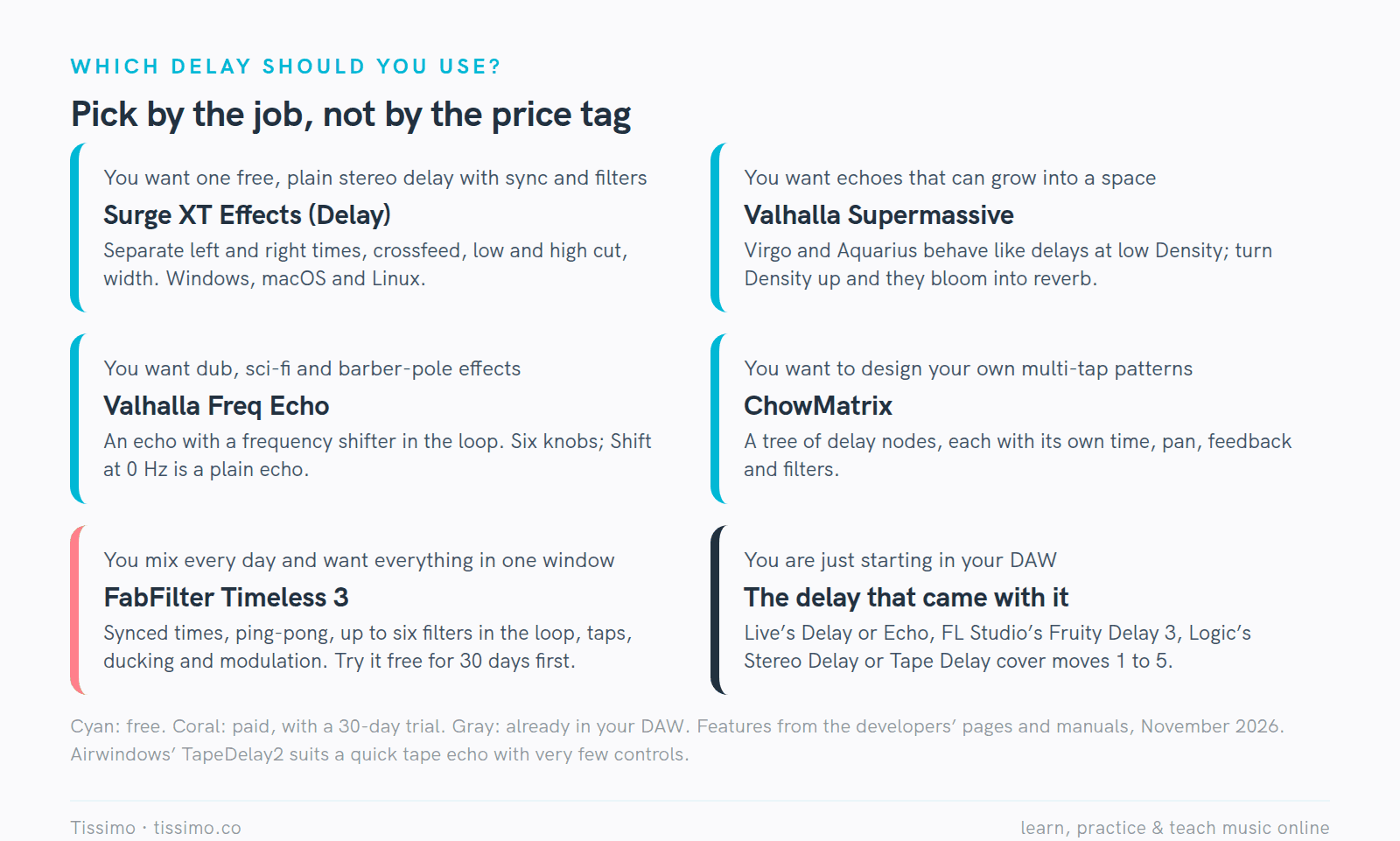
Pick by the job. Every option here can do a slapback, a synced echo and a throw.
If you'd like someone to listen to your mix with you and set up the first delay return together, a Tissimo music production teacher can do that in a live online lesson.
Free worksheets for this lesson
- Tempo Math: Beats, Bars and Delay Times — turn BPM into quarter, eighth, sixteenth and dotted-eighth times in milliseconds, with listening examples
- The Dotted Eighth + Sixteenth — the three-quarter-beat note behind the classic dotted-eighth echo
- Triplets — three even notes in one beat, the basis of triplet delay times
Sources
- Timeless 3 — FabFilter
- Shop and prices — FabFilter
- Downloads and trial terms — FabFilter
- Valhalla Freq Echo — Valhalla DSP
- Friday Free Plug-in: Valhalla Freq Echo — Production Expert
- Valhalla Supermassive — Valhalla DSP
- ChowMatrix User Manual — Chowdhury DSP
- Surge XT User Manual — Surge Synth Team
- Airwindows Consolidated plugin manual — Airwindows / Paul Walker
- Six Practical Uses For Delay, Julian Rodgers — Sound On Sound
- Creating & Using Custom Delay Effects, Geoff Smith — Sound On Sound
- Using Your Plug-in Delay Effects, Paul White — Sound On Sound
- Live 12 Reference Manual: audio effects — Ableton
- Fruity Delay 3 — Image-Line
- Tape Delay in Logic Pro — Apple
Read this article online: https://tissimo.co/articles/delay-plugins-compared-timeless-3-freq-echo-chowmatrix-and-more



Comments